



Thinking about using KidsGuard Pro to keep tabs on your kid’s phone? Same here. On paper, it looks solid with location tracking, message monitoring, social media tracking, and everything else you’d expect to see in similar apps. But is it as good as advertised?
That’s why this review exists: to give you answers without the hype from developers. Just what works, what doesn’t, and why a lot of people end up ditching KidsGuard Pro for something like uMobix, which is way smoother and just easier to deal with.
Our Verdict About KidsGuard Pro
| Our rating | Score |
|---|---|
| 2.5 / 5 |
Our KidsGuard Pro review showed that the app has a decent pitch, but once you actually use it, the experience feels… off. For starters, you’ll need to install separate apps just to track different platforms. Want to monitor WhatsApp? That’s one app. TikTok? Another one. Snapchat? You guessed it – another one. It gets old fast. And the dashboard doesn’t really pull everything together in one clean view, so you end up bouncing between tabs or apps trying to piece it all together.
Some features work okay, like the photo gallery and GPS, but others are just missing entirely (there’s no screen recording and no time limits). Moreover, the blocking tools are either super limited or only available if you switch to the regular (non-Pro) version. Which… makes zero sense.
How Does KidsGuard Pro Work?
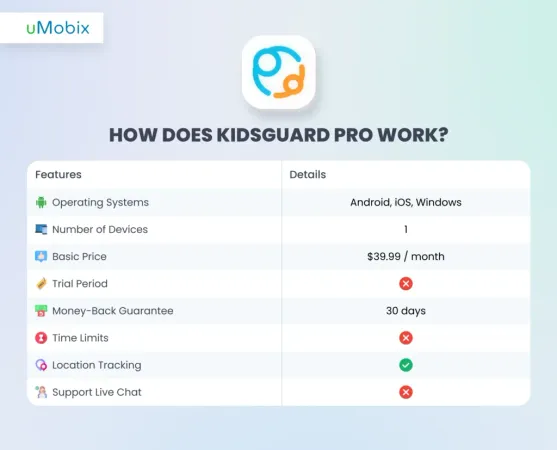
As a classic once put it, it just works. But how does KidsGuard Pro work? Well, we will see this in the table below:
It’s easy to install the KidsGuard Pro app. Just follow these steps:
- Log in to your ClevGuard ID (as they put it) using your Google account, iOS, or just plain email+password combo.
- Choose between plans (it can get confusing, but we describe everything in detail below).
- Pay for the subscription with your credit card, PayPal, or Google Pay. Just take a double-take at your cart – you can get more products than you bargained for (in our case, it was a 1-month plan, a 1-month plan Lite, and a 1-month plan with extra storage for 3 GB, which all totaled over $100).
- Once everything is paid for, wait until it’s processed, and use the KidsGuard Pro app as you like!
KidsGuard Pro Pricing: What Does It Actually Cost?
One thing that catches a lot of people off guard is how many line items end up in the cart. Here’s the honest breakdown — before any upsells sneak in.
KidsGuard Pro for Android
| Plan | Total price | Per month | Devices |
|---|---|---|---|
| 1 month | $39.99 | $39.99 | 1 |
| 3 months | $59.99 | ~$20.00 | 1 |
| 1 year Best value | $109.99 | ~$9.17 | 1 |
KidsGuard Pro for iOS
| Plan | Total price | Per month | Devices |
|---|---|---|---|
| 1 month | $49.99 | $49.99 | 1 |
| 3 months | $79.99 | ~$26.67 | 1 |
| 1 year Best value | $129.99 | ~$10.83 | 1 |
⚠️ Watch out for checkout upsells. During our test, KidsGuard Pro automatically added three extra products to the cart — a WhatsApp monitor, a TikTok monitor, and an iCloud Lite plan — pushing the total past $100 without any clear warning. Always review your full cart total before hitting Pay.
How KidsGuard Pro Works: Feature-by-Feature Breakdown
Here’s what the app actually does — and where it quietly falls short.
| Feature | Available | Works on | Notes |
|---|---|---|---|
| GPS location tracking | ✓ Yes | Android, iOS | Real-time with timeline history |
| Geofencing alerts | ✓ Yes | Android, iOS | Custom zones with active hours |
| Wi-Fi location logging | ✓ Yes | Android, iOS | Shows connected networks and duration |
| SMS & call log monitoring | ✓ Yes | Android, iOS | Full Pro plan required for call logs |
| Call recording | ⚠ Limited | Android only | Unreliable on many devices; not on iOS |
| Keylogger | ✓ Yes | Android only | Captures all keystrokes by app |
| Photo & video access | ✓ Yes | Android, iOS | Full gallery with timestamps |
| WhatsApp monitoring | ⚠ Separate app | Android, iOS | Requires installing KidsGuard for WhatsApp |
| TikTok monitoring | ⚠ Separate app | Android | Requires installing KidsGuard for TikTok |
| Instagram monitoring | ⚠ Separate app | Android | Requires installing KidsGuard for Instagram |
| Browser history | ✓ Yes | Android, iOS | Visit frequency and timestamps included |
| App usage & screen time | ✓ Yes | Android, iOS | App name, version, daily frequency |
| Remote screenshots | ✓ Yes | Android only | On-demand capture via dashboard |
| Ambient microphone recording | ⚠ Android only | Android only | Records surroundings; not on iOS |
| App blocking | ✗ Not in Pro | — | Only in the standard KidsGuard app |
| Website blocking | ✗ Not in Pro | — | Only in the standard KidsGuard app |
| Screen recording | ✗ No | — | Not available in any KidsGuard version |
| Deleted message recovery | ✗ No | — | Messages deleted before sync are gone |
| Stealth mode | ✓ Yes | Android, iOS | App icon hidden after install |
| Root / jailbreak required | ✗ No | Android, iOS | iOS RT version is the exception |
KidsGuard Pro Main Features: What Can You Do with This App?
Powered by ClevGuard, the KidsGuard Pro app has lots of features, and we’ll showcase most of them in the KidsGuard Pro review below:
Social Media
Our KidsGuard Pro review revealed that the app supports major platforms, including WhatsApp, Instagram, TikTok, and Snapchat. The teeny-tiny problem is that to actually get full access to messages, call logs, and media, you’ll need to install separate apps for each platform. One for WhatsApp, another for TikTok, another for Snapchat… it adds up fast and isn’t exactly user-friendly.
While the TikTok and YouTube monitoring is more advanced than what most parental apps offer, the whole setup feels fragmented. Everything isn’t centralized, and unless you’re fine juggling multiple installs and interfaces, it can get annoying quickly.
Location Tracking
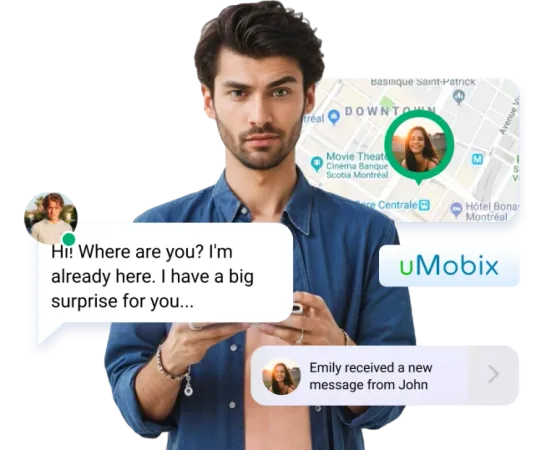
With KidsGuard Pro’s location tracking, you can see where your kid is right now, where they’ve been, and when they were there. The GPS is accurate enough, and the timeline view is helpful if you want to verify whether they actually attended school or just claimed to have done so. But honestly, it’s nothing you can’t get from a dozen other apps that are easier to use.
Our KidsGuard Pro review revealed that you can have the Geofence feature and can set zones like “school” or “grandma’s house” and get alerts if they leave or enter during certain times. But the setup is kind of a pain. You can name zones and select specific times when they’re active, which is convenient, but the entire setup feels more complicated than it needs to be.
There’s also a Wi-Fi tracker, which shows what networks your kid’s phone connected to and for how long. Maybe helpful if GPS completely drops the ball, but in most situations, it just feels like extra data you’ll never look at.
Text and Call Monitoring
If you’re curious about who your kid’s texting or calling, our KidsGuard Pro review uncovered that KidsGuard Pro phone monitoring of texts, call logs, contact names, timestamps, etc, is a thing. Sounds good? Great, now forget about it. Unless you pay for the full Pro version, you don’t even get the basics like call logs. And while there’s a call blocking feature, it feels like an odd trade: either you go all-in with super detailed tracking, or you get barely anything.For texts, you can read every message, no matter how far back it goes. There’s even a keyword search, so if you’re worried about certain topics (drugs, bullying, whatever), you can dig straight into that. But it’s not exactly user-friendly, and you’ve got to scroll through a lot if you’re trying to keep up with everything when having KidsGuard Pro phone monitoring.
Blocking Features
Our KidsGuard Pro review showed that the KidsGuard Pro app doesn’t let you block websites, which is wild for something that calls itself “Pro”. So, if you want to do any actual blocking, you have to switch to the regular KidsGuard app and now manage two apps just to cover basic features.
App blocking’s not terrible, and you can block something like TikTok completely, or just shut it down from 10 PM to 7 AM, for example. But again, you don’t get any of that in the Pro version, which makes no sense.
Moreover, our research for the KidsGuard Pro review showed that you can check browser history in both versions, which displays information such as visit times and the frequency of visits to a site. But honestly, if your kid’s already watched an hour of content you would’ve blocked, what’s the point of seeing it after the fact?
Control Panel
Our KidsGuard Pro review revealed that the control panel in the KidsGuard Pro app is simple enough. The main dashboard shows your kid’s screen time and what apps they’re glued to, plus it even tells you when their phone battery’s running low. Installing it on iPhone, however, requires you to get to your kid’s computer, which feels old-school and inconvenient.
Also, the web dashboard doesn’t log you out automatically. So if you get distracted and forget to sign out, your info’s just sitting there, which feels like KidsGuard skipped a basic security step.
Photo & Video Monitoring
The KidsGuard Pro app shows every single photo and video on the kid’s phone, complete with timestamps and albums, which you can download to a computer. Sure, there’s a search feature to filter by keywords or dates, but you won’t be able to see where the picture was taken.
KidsGuard Pro Pros and Cons
Consider the KidsGuard Pro pros and cons section as a quick summary of everything you’ve read. So, what’s good and bad about the app?
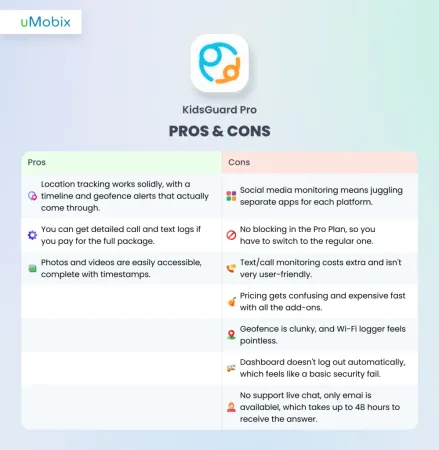
KidsGuard Pro Pros and Cons
- GPS location tracking is accurate and includes a timeline view
- Geofencing alerts work as advertised — you can set custom zones and active times
- TikTok and YouTube monitoring is more detailed than most competitors
- Full photo and video gallery access with timestamps
- Keyword search inside messages speeds up monitoring
- Keylogger captures every typed character across native apps
- Works without rooting or jailbreaking for most features
- Wi-Fi location logging adds a fallback when GPS is weak
- No screen recording and no app-based time limits in the Pro version
- Website blocking is only available in the separate (non-Pro) KidsGuard app
- Each social media platform requires installing a separate add-on app
- iOS version is far more limited — no real-time sync, no social media monitoring without jailbreak
- Dashboard doesn’t auto-log-out, leaving your data exposed
- No access to deleted messages
- Checkout is confusing — extra products get added to cart without clear notice
- Customer support is slow and primarily email-only
- Call recording feature is unreliable on many Android devices
KidsGuard Pro Reviews from Real People
Do people love the KidsGuard Pro app? Probably. But we went out of our way to see what users write on Trustpilot’s KidsGuard Pro reviews, and… it’s mostly bad news. Many people jumped in thinking it’d be a straightforward way to keep tabs on their kid’s phone, but instead, they got stuck wrestling with a setup process that feels like it needs a degree in tech support. Then the app itself starts glitching, stops syncing data, and good luck getting any real help from customer support because it’s mostly crickets or canned responses.
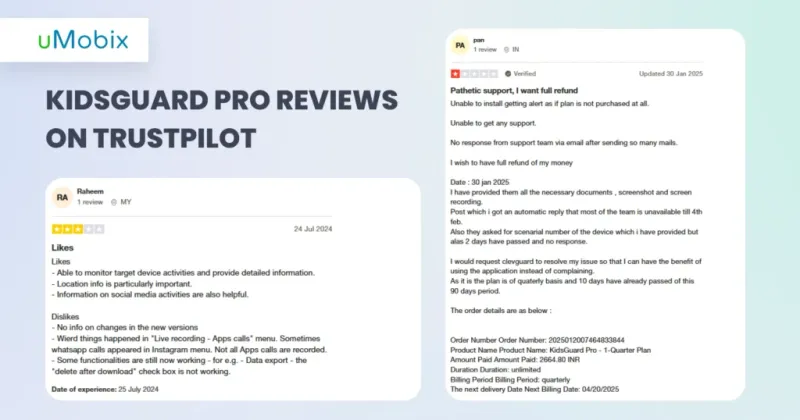
And it’s not just annoying bugs. People feel totally left hanging when they reach out for help, some users got hit with unexpected charges, and if you’re on an iPhone, expect a headache because the app barely functions:
- Support might as well not exist with their slow replies, automated emails, or no answers at all.
- The app crashes or stops updating after a couple of days, making it useless.
- Tons of KidsGuard Pro reviews say the good reviews are fake, posted by the company to cover up all the bad ones.
- A few users claim their personal info was mishandled or stolen.
- Location tracking often doesn’t update, so parents are left guessing what’s going on.
- No phone support means you’re stuck emailing forever with little to no help.
- European KidsGuard Pro reviews say the company ignores consumer laws, making refunds and cancellations a real headache.
uMobix as KidsGuard Pro’s Best Alternative
We established that the KidsGuard Pro app is a wild ride. So why not use a great alternative that makes everything better and, well, usable?
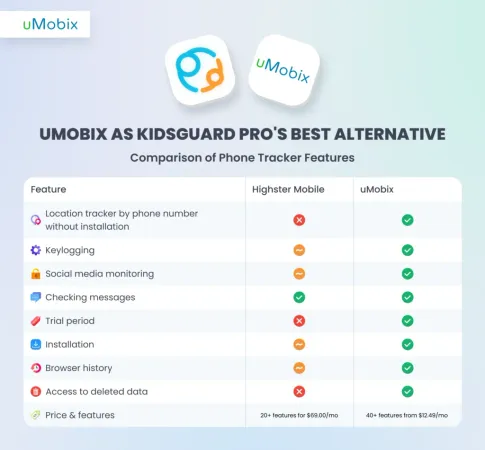
Location Tracker
KidsGuard Pro’s location tracking works… but it’s kinda clunky and takes some fiddling to get right. You get GPS updates, a timeline, and geofence alerts, but it doesn’t feel very polished.
On the other hand, uMobix is way smoother. The GPS is super accurate and updates fast, showing exact spots on Google Maps. Plus, it runs in stealth mode, so your kid won’t even know you’re tracking, and it comes equipped with a feature to track by phone number without installing anything (solely for you to exist with more ease).
Social Media Monitoring
KidsGuard Pro requires you to install separate apps for each platform. So, one app for WhatsApp, another for TikTok, and so on, which becomes real old real fast. Sure, its TikTok and YouTube tracking is better than most, but the whole thing feels all over the place: you’re juggling multiple installs and apps, which is not exactly what you want when you’re trying to keep things simple.
uMobix gets you full tracking for Facebook and Instagram on iPhone, with news feeds, comments, and settings. For Android, it goes further with real-time screenshot monitoring across major platforms like Facebook, Instagram, TikTok, Tinder, Snapchat, etc. If keeping an eye on social media is your priority, uMobix actually makes it doable without all the headaches.
Checking Messages
If you want to see who your kid’s texting or calling, KidsGuard Pro promises a lot, but unless you cough up for the full Pro version, you don’t even get basics like call logs. For texts, you can read all messages, but the app isn’t super user-friendly, and scrolling through endless messages can get exhausting. Keyword search helps, but it’s still not the best option.
Now, uMobix makes this way easier. You get to see all sent and received messages (including the deleted ones), and you get full conversation histories with timestamps, so nothing slips through the cracks. It just works.
Installation
If you’re trying to set up KidsGuard Pro, brace yourself. On Android, you have to physically get your kid’s phone for about 10 minutes, then jump through hoops like disabling Google Play Protect. If it’s an iPhone, it’s even worse: you need their phone and a computer with iTunes installed. Then you’re stuck downloading software, syncing devices on the same Wi-Fi, and waiting forever for everything to line up.
uMobix comes in way cleaner and simpler. On Android, all you do is click a link, and you’re basically done in minutes. For iPhones, you don’t even need the device itself, just their iCloud info, which saves you a ton of time and effort.
Access to Deleted Data
One big downside with KidsGuard Pro is that it doesn’t give you access to deleted data. So if your kid deletes a message or something inappropriate from their chats, you’re basically out of luck.
uMobix, on the other hand, can actually recover deleted messages, and it doesn’t matter if they wiped them from text threads or messaging apps. That means if you’re worried your kid’s hiding something, uMobix can show you exactly what was deleted and when.
Why Choose uMobix as Your Cell Phone Tracker
If you’re hunting for a phone tracker that actually makes your life easier instead of more complicated, uMobix is the real deal and offers you:
- The GPS updates fast and nails your kid’s exact location on Google Maps, and if installing an app isn’t possible, uMobix can track by phone number without touching their device.
- uMobix records everything (typed messages, passwords, copy-pastes), all with timestamps and the app they used.
- Kids delete messages all the time, but uMobix catches them anyway. You get full conversation history with timestamps, and even messages that were wiped.
- On iPhones, you get to see Facebook and Instagram feeds, comments, and settings. Android users get real-time screenshots from popular apps like TikTok, Snapchat, and Tinder.
- You can test uMobix for a day for just $1.
- You get complete browser history from all the big browsers, plus deleted history too.
Conclusion
KidsGuard Pro feels like a patchwork of features that are hard to install, expensive to upgrade, and way too fragmented to be practical (so much so that you’d be asking yourself, “Is KidsGuard Pro detectable?”). You’re constantly jumping through hoops, downloading extra apps, and paying for things that really should’ve been included in the first place.
If you’re serious about keeping your kid safe and want something that just works, uMobix is the better choice. It’s cleaner, faster, actually delivers on its promises, and gives you all the features upfront.
FAQ
For most Android users, no. After installation the app icon disappears from the home screen and app drawer, running silently in the background. A tech-savvy teen who digs through Settings → Apps → All could potentially spot it, and some anti-malware scanners flag it. Battery drain and unusual data usage are also indirect tells.
On iPhone it's more nuanced. The iCloud monitoring version leaves no trace on the device since nothing is installed — but Apple may send the account holder a login alert. The iOS direct install version is harder to conceal due to Apple's tighter security model.
If you're using it to keep an eye on your own child's phone, yes — that's exactly what it's made for. Where it gets into trouble is if you install it on an adult's phone without telling them. That's illegal in most places, including the US, UK, and Europe. So if you're thinking about putting it on a partner's or spouse's phone — don't. That crosses a legal line pretty much everywhere.
No, and that's genuinely one of its better qualities. You don't need to do anything technical to the phone — no rooting, no jailbreaking. You just need the phone in your hands for about 5–10 minutes to get it set up. On Android you'll also need to turn off Google Play Protect before installing, which takes about 30 seconds.
The only exception is a separate product called KidsGuard Pro for iOS RT, which does need a jailbroken iPhone. But the regular version doesn't.
They're two separate apps sold by ClevGuard and the naming is genuinely confusing. KidsGuard (standard) is a traditional parental control app — it lets you block websites, block apps, and set screen time limits. KidsGuard Pro is a surveillance-first app — it records calls, logs keystrokes, and monitors social media, but strips out almost all blocking and limiting tools. If you want both monitoring and blocking, you'd need to run both apps side by side. Neither is a complete solution on its own.
For Android users who need deep monitoring — reading messages, tracking keystrokes, seeing exact locations — it delivers most of that at a reasonable price, especially on the annual plan. Where it falls short: iOS features are severely limited, social media monitoring requires juggling multiple extra apps, there are no screen time limits or blocking tools in the Pro version, and customer support is slow with no live chat option. For most parents, an all-in-one alternative like uMobix ends up being easier to set up and more reliable day-to-day — without the surprise charges at checkout.

