

Have you ever thought a deleted call log was completely gone for good? In reality, that’s not always the case. Even when call history is cleared from a phone, traces can still exist elsewhere: in backups, carrier records, or monitoring tools.
In some situations, you might be able to recover the full call history with all details intact. In others, you’ll only find partial information, like phone numbers, timestamps, or call duration. And sometimes, there’s simply nothing left to recover at all. It all comes down to what was enabled on the device before those calls were deleted.
But how to see deleted calls?
It is easier than you think. Just check on your own!
Can You See Deleted Calls on Android?
In short, yes, you can, but only in certain situations. So, can you see deleted calls on Android? The answer depends on two main things: whether a backup was enabled and how long ago the calls were removed.
Necessary to point out that Android doesn’t store deleted call logs by default, so once they’re gone locally, you need another source to bring them back. Compared to iPhones, Android devices usually don’t have a built-in “recently deleted” feature for call logs. That means recovery is more dependent on backups or external records. So if you didn’t have anything synced or saved beforehand, recovering appels supprimés becomes much harder.
Why Do People Delete Their Call History?
There is no single answer to this question because there are many reasons someone might clear their call log. Sometimes it’s accidental: you have just tapped, and the history is gone. Other times it’s intentional, like freeing up space or keeping things private. Some people also enable a special feature on their cell phones that automatically deletes older logs.
There are also cases where people delete calls to hide who they’ve been talking to. This is where it becomes more important for parents, since kids may clear call history to avoid questions about suspicious or sensitive contacts or conversations.
How to Find Deleted Calls on Android: 4 Methods That Work
If you’re asking how to find deleted calls on Android, here are the most practical methods you should know about. Some rely on backups, others on external data sources. Let’s discuss each one below.

Method 1: How uMobix Lets You View Deleted Calls History in Real Time
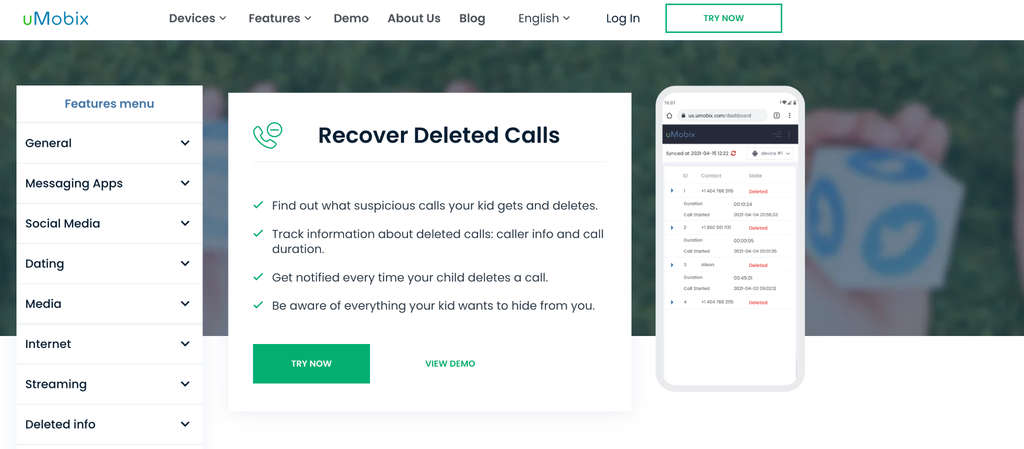
Do you want to view the deleted calls history without constantly trying to recover lost data? We have a solution for you – uMobix. However, it works very differently from everything else. Instead of attempting to bring deleted calls back after they’re gone, uMobix records call activity as it happens. So even if someone clears their call log later, the information is already safely stored in your dashboard.
- Real-time call tracking: Every incoming and outgoing call is captured the moment it happens, including the phone number, call duration, and exact time.
- Deleted calls are clearly marked: When a call disappears from the phone, you’ll still see it in your dashboard, but with a clear indication that it was deleted. This makes it easier to understand not just the call itself, but also what someone might be trying to hide.
- Caller details and patterns over time: You’re not just seeing isolated calls; you’re also tracking frequency (the app also has a built-in SMS tracker for Android), repeated contacts, and unusual activity patterns.
- Instant alerts about deleted activity: Every time a call is removed from the device, you get notified. So, you will definitely know what they want to hide and why.
- All data is easy to access: Call logs, including deleted ones, are saved in your account for at least 90 days, so you don’t have to check constantly. Even if you miss something during the day, it will still be there waiting for you in your dashboard.
Kids don’t always realize the risks of answering calls from unknown numbers or sharing information with strangers, and sometimes they delete logs to avoid questions. With this setup, parents don’t have to guess. You can actually see what’s happening and step in if something feels off.
How to find deleted calls on Android, or how to see your child’s text messages without them knowing, with uMobix?

- Registre: Create your account and choose a plan that fits your needs.
- Installer: Follow the step-by-step instructions to set up the app on your child’s Android device.
- Moniteur: Open your dashboard and start tracking your kid’s call activity in real time.
uMobix works on all Android devices, doesn’t require rooting, and the setup is straightforward, even if you’ve never used tools like this before. There’s also 24/7 customer support, so if anything feels unclear, you can get help right away.
Method 2: How to Retrieve Deleted Calls on Android via Google Account Backup
If your phone had backup turned on before the calls were deleted, there’s a chance you can use to know how to retrieve deleted calls on Android using your Google account. This method doesn’t work instantly, though. It requires restoring your device to a previous state, which comes with a few important trade-offs.
- Backup-based recovery: Google can automatically save certain types of data, including call history, if backup is enabled on your device. This usually runs in the background without you noticing, syncing your data to your Google account.
You can check whether this was active by going to “Settings”, “Google”, “Backup”, and looking for recent backup activity. If the last backup was created before the calls were deleted, there’s a chance those call logs are still stored there and can be restored. - Full device restore required: Unlike some tools where you can just “pull out” deleted data, Google backup doesn’t let you selectively recover only call logs. To get that data back, you’ll need to reset your phone to factory settings, then restore it during setup using your Google account. This essentially rolls your device back in time to the moment when the backup was created, including your call history at that point.
- Main drawback: Restoring a backup replaces your current data with older data from the backup. It means that anything added after the backup, such as new photos, messages, apps, or settings, can be lost if it’s not saved elsewhere. Because of that, this method is usually only worth it if the deleted call logs are really important and you’re prepared to deal with potential data loss.
This method can work, but it’s not something most people use casually. It’s more of a “last step” option when you know a backup exists and you’re willing to trade recent data to get those deleted calls back.
Method 3: Check Your Mobile Carrier Records
This is one of the most overlooked ways to view deleted call history, and surprisingly, it often works even when everything is gone from the phone itself. So, how to see deleted calls using this method?
- Carrier assistance: Mobile carriers keep records of all calls that pass through their networks, primarily for billing and service tracking. These logs usually include the phone number, date, time, and duration of the call. Even if you’ve cleared your call history on the device, those records still exist on the carrier’s side.
- Available even after deletion: What makes this method useful is that it doesn’t depend on your phone at all. You could delete your entire call log, reset your device, or even switch phones, and the carrier would still have that information saved for a certain period.
- How to access it: In most cases, you can log in to your mobile carrier account on their website or in their app and find call history under the usage or billing sections.
If it’s not available there, you can request detailed records through customer support. Just keep in mind that carriers only store technical details, so you won’t see the content of calls, only the fact that they happened.
If you start noticing repeated unknown or suspicious numbers in your call history, it may be a good time to learn how to protect yourself from spam calls and avoid unnecessary or unwanted contact in the future.
Method 4: Use Third-Party Call Recovery Apps
You can come across apps that promise to show you how to find deleted calls on Android by scanning your phone’s internal storage. While the idea sounds appealing, the reality is a bit more complicated.
- Data scanning approach: These apps work by scanning leftover data fragments in your device’s memory. When something is deleted, it isn’t immediately erased, and it’s just marked as available space. Some recovery tools try to detect those fragments before they get overwritten and piece them back together, which is why they sometimes manage to recover partial call logs.
- Requires root access: On most Android devices, full access to system-level data (where call logs are stored) is restricted. To get around that, many recovery apps require rooting the phone, which essentially unlocks deeper access to the operating system. The downside is that rooting can void warranties, reduce security, and potentially cause system instability if not done properly.
- Unreliable results: Even with the right setup, results are far from guaranteed. If the data has already been overwritten by new activity, there’s nothing left to recover. On top of that, some apps overpromise and underdeliver, and others may raise privacy concerns. That’s why this method is usually treated as a last attempt rather than a dependable solution.
Can You See Deleted Calls on Someone Else’s Android?
If you’re trying to figure out how to track calls and texts from another phone, you should only do it on a device you own or have clear permission to monitor. Accessing someone’s private data without consent can lead to serious legal issues, so it’s not something to take lightly.
See call activity in real time
Track calls and messages on a device you own with clear, updated activity logs in one dashboard.
For parents, though, this concern is completely valid. Instead of trying to recover deleted calls, tools like uMobix take a different approach: they track calls in real time. That means the information is already saved before anyone can delete it.
With this kind of setup, you can see who your child is calling, how often they call, and when during the day. Over time, this gives you a clearer sense of patterns, not just isolated events, which is often more useful when you’re trying to understand what’s really going on.
Conclusion
Deleted calls aren’t always gone for good, but getting them back isn’t always easy. Sometimes a backup helps, sometimes your carrier still has the records, and sometimes… there’s just nothing left to recover. It really depends on what was set up before those calls were deleted.
That’s why a lot of people, especially parents, end up moving away from recovery and focusing more on prevention. Tools like uMobix work in that direction by saving call activity as it happens, so you’re not left guessing later.
FAQ
Yes, but only in certain situations. If a backup was enabled or your mobile carrier stores call records, you may still access basic details such as numbers, timestamps, and call durations. Without those, deleted calls are usually removed from the device and harder to recover.
Without a backup, your options are limited, but you can still check mobile carrier records, which often store call details for billing purposes. You can see deleted calls on your child's phone using uMobix.
Not always. Deleted calls disappear from your phone’s visible history, but they may still exist in backups or carrier records for some time. However, if no backup exists and the data gets overwritten, recovering those calls later becomes very unlikely.
Yes, parents can see deleted calls if they use tools that track call activity in real time or have access to backups or carrier records. Monitoring solutions like uMobix allow parents to view call logs even after they are deleted from the device.
It depends on the situation. Accessing another adult’s phone without consent can violate privacy laws. However, parents are generally allowed to monitor their child’s device. It’s always important to follow local laws and ensure you have proper permission before accessing such data.

Arrêtez de deviner, suivez le mouvement avec uMobix
Une application parentale qui assure votre tranquillité d'esprit
Essayer maintenantDerniers messages
- Does Blocking Someone on Instagram Delete Messages? And Other Instagram Questions Parents Ask
- How to Read Encrypted WhatsApp Messages: What’s Actually Possible
- How to See Deleted Search History: Methods That Actually Work
- How to See Deleted Reddit Posts: Methods That Actually Work
- How to Tell If Someone Blocked You on Instagram: Sure Signs to Look For


