


If you’re trying to figure out how to find someone’s deleted Instagram posts, you’re definitely not alone, but it’s important to start with the truth. Instagram only allows users to recover their own deleted posts for a short time using the Recently Deleted feature. When it comes to other people’s content, there is no official tool to view their deleted posts. After Instagram’s deletion window has passed, the content is permanently removed from user access. Claims that third-party apps can magically restore deleted Instagram photos are usually misleading, risky, or outright scams.
That doesn’t mean your search is pointless, but it does mean your options are limited. In this review, you will find out what is possible, what isn’t, and how to see someone’s deleted Instagram posts safely and ethically.
Can You Actually See Someone’s Deleted Instagram Posts?
The short answer: No, you cannot view another person’s deleted Instagram posts through Instagram itself.
Here’s why:
- Instagram’s Recently Deleted feature lets you access your own deleted posts for about 30 days before permanent removal. Others can’t see that folder unless they have direct access to the account.
- After this period, Instagram purges the content from active systems (though backups might technically exist internally for up to 90 days). These aren’t accessible to users.
- There’s no official Instagram tool or policy that lets you recover deleted Instagram photos of others.
Because of too much information, people are confused about what is real and what is a myth, as some sources say one thing while others claim the opposite. So, what is the truth and what is just a myth?
Myth 1: If a post is deleted, it’s completely unrecoverable in every situation.
Reality: Once Instagram completes its deletion process, the content is removed from the platform’s user-facing systems. However, copies may still exist outside Instagram’s control, such as in web caches, archived snapshots, device backups, screenshots, etc.
Myth 2: Instagram itself offers secret tools or hidden settings that allow you to view other people’s deleted posts.
Reality: Instagram does not provide any native feature that allows users to access content removed from someone else’s account.
Myth 3: Every website or tool claiming to show deleted Instagram content is automatically safe and reliable.
Reality: Some methods rely on legitimate technical processes (such as caching or archiving), while others expose users to serious risks, including data theft, malware, and account compromise. Careful evaluation is essential before using any external service.
Use Methods that Really Work!
Find Someone’s Deleted Instagram Posts with uMobix
Why People Delete Instagram Posts
Life changes. Thus, a post that once felt great may later seem unpleasant, so people decide to remove it from their album. Breakups, new relationships, career shifts, or significant personal growth often trigger a cleanup of old content that no longer represents who they are.
Another common reason is content strategy. Influencers, creators, and even everyday users regularly delete or archive older posts to create a more aesthetic feed, improve engagement, or support a new personal brand or rebrand.
Finally, mistakes happen – posts can be removed accidentally, during bulk cleanups, or while reorganizing a profile.
All of these reasons explain why deletion is such a protected action on Instagram.
7 Methods to Find Someone’s Deleted Instagram Posts
Still asking yourself how to find someone’s deleted Instagram posts? Below are legitimate methods focused on contextual or indirect approaches. Each section explains what’s realistic and ethical.

Method 1: Check If They Are Archived Instead of Deleted
People don’t actually delete a post. They archive it. Archived content is hidden from the public but still stored in the account’s archive.
- Archived posts behave differently from deleted ones: they’re simply hidden and don’t go to Recently Deleted.
- If the person has shared their archive with you (e.g., if it’s your account or they gave you access), you can view those posts.
- Archive vs. delete is a typical mix-up and a clue for what is going on.
In short: Instagram archived posts might still be there – deleted ones likely aren’t.
Method 2: Search Your Own Saved Posts
How to see deleted Instagram posts of others? If you previously saved their posts to your own Instagram collection, those are still yours even if they deleted them from their profile.
- Your saved collection stays intact unless you manually remove items.
- This only works for posts you saved before they were deleted.
Method 3: Check Instagram Data Download
You can request a full download of your Instagram data to see deleted posts. However, take into account that:
This does not include content deleted from someone else’s account.
- Deleted content may or may not appear. It depends on how Instagram’s data retention policies applied at the time you deleted it.
Note: This only applies to your own account.
Method 4: Use Wayback Machine for Public Profiles
The Internet Archive’s Wayback Machine occasionally has snapshots of public Instagram pages. How to find someone’s deleted Instagram posts using this method?
- Visit archive.org and search the user’s Instagram profile URL.
- Sometimes older public posts are preserved there, but rarely in their entirety.
- Many Instagram page snapshots only capture login pages, not post content.
Method 5: Search Google Cache
Search engines like Google sometimes cache public content. But how to see deleted Instagram posts of others using Google cache?
- Search for the user’s profile URL in your browser, then append “cache”: to the URL.
- It may show a past visible version if Google indexed it.
- Only works for public accounts.
- Not reliable for deleted posts.
Method 6: Check Screenshot or Screen Recording Apps
Do you want to know the simplest way to see someone’s deleted Instagram posts? If you or someone else already captured the post (screenshots, screen recordings, etc.), that’s your best “recovery.”
- Smartphones or third-party gallery backups might still have copies.
- Ask friends, collaborators, or tagged accounts if they saved the photo or video.
- This is the most realistic way to find deleted content that once existed.
Method 7: Use Instagram Monitoring Tools (For Parents)
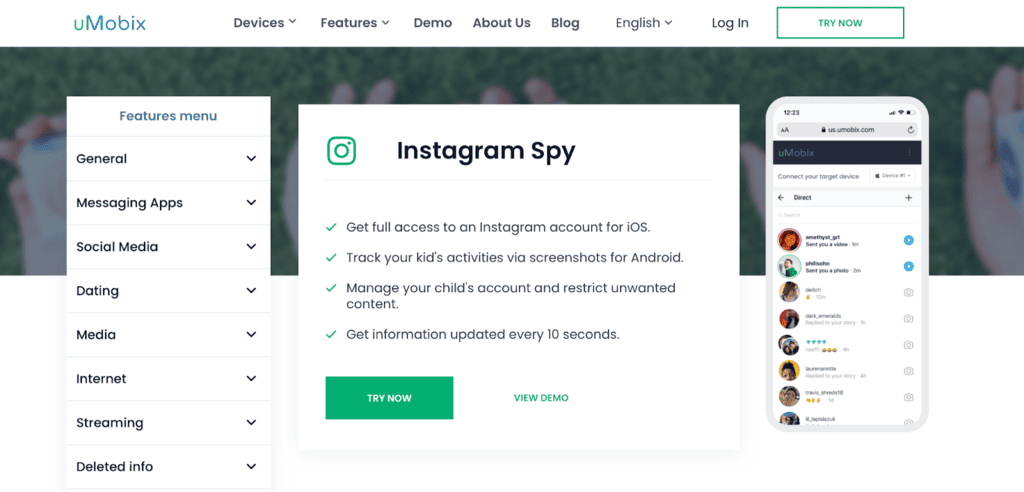
When it comes to children’s protection, uMobix is the best option. Rather than claiming to retrieve content that has already been removed from Instagram’s servers, the platform focuses on capturing activity as it occurs. On Android devices, this Instagram spy app records on-screen actions by automatically taking screenshots every 10 seconds, creating a continuous timeline of Instagram activity. It allows parents to review messages, comments, shared content, interactions, and behavioral patterns that may later be deleted or altered. These records are stored securely in the parents’ private dashboard for up to 180 days, with options to extend the storage period.
But how to view someone’s deleted Instagram posts with uMobix? Or how to see someone’s Instagram messages with it?
The setup process is designed to be simple: parents register, choose a subscription plan, install the application on the child’s device, and begin monitoring activity through an online control panel that updates frequently.
uMobix’s Instagram parental controls include viewing and responding to direct messages, moderating and replying to comments, reviewing followers, and overseeing overall account activity. It is really one of the best social media apps, allowing parents not only to observe potential problems but also to intervene actively when necessary.
It is essential to note that tools like uMobix are intended strictly for legal and ethical use. The software may be installed only on devices owned by the parent, used by their children, or for which explicit consent has been given. Responsible use ensures that monitoring remains focused on safety, education, and trust rather than on privacy invasion.
Below is a comparison of the other popular tools parents might consider for monitoring Instagram activity. These tools vary widely in capability, platform support, and the extent to which they capture interactions before content removal.
How to See Someone’s Deleted Instagram Stories
Wanna know how to view someone’s deleted Instagram posts they share in stories? Instagram stories are even more ephemeral:
- Original stories disappear after 24 hours unless saved to Highlights.
- There’s no way to retrieve another user’s deleted story unless they share it with you or have saved it in a highlight.
- Public archives (like Wayback Machine) generally don’t capture stories.
Stories are time-limited by design – so your chances here are even slimmer than with posts.
Third-Party Apps That Claim to Show Deleted Posts
When people Google “How to see someone’s deleted Instagram posts?”, they often find plenty of third-party apps that claim to make it easy. But be cautious because almost all apps that promise the magic recovery of others’ deleted posts are scams:
- They might ask for your login, risking credential theft.
- Instagram’s Terms of Service prohibit unauthorized access; using such tools could lead to account suspension or legal trouble.
- Many are malware or phishing fronts.
Legal and Ethical Considerations
Respect privacy and consent:
- Accessing someone’s deleted content without their permission is invasive and potentially unlawful.
- In some jurisdictions, this could violate privacy laws like the GDPR or equivalent data protection regulations.
- Unauthorized access can also breach Instagram’s own Terms of Service.
Thus, always err on the side of respect and legality.
For Parents: Monitoring Teen Instagram Activity
How to see someone’s deleted Instagram posts if you are a parent of a teenager? If you’re a parent concerned about a teen’s Instagram use:
- Use a reliable parental control app responsibly and communicate clearly.
- These tools can help record activity before deletion, not after.
- Prioritize trust and safety, not spying without consent.
Monitoring should always be ethical, transparent, and aligned with local laws.
How to Prevent Your Posts from Being Retrieved
From the reverse perspective – if you want to ensure your deleted Instagram photos aren’t seen by others:
- Delete and remove backups from your phone/cloud.
- Clear cache and off-app storage regularly.
- Avoid saving content in public archives or third-party services.
- Understand that screenshots others took may persist outside your control.
Once something is public, you can’t force it to disappear completely if others saved it.
Conclusion
Understanding how to find someone’s deleted Instagram posts requires accepting Instagram’s privacy rules and limitations. Once a post is deleted and the platform completes its removal process, it is generally gone for everyone except the original poster. Some indirect methods may provide limited information if the content was captured before it was deleted. Attempting to bypass protections or using unverified third-party tools can be risky and lead to legal issues. Thus, always use reliable tools, respect privacy and legal boundaries, and conduct yourself responsibly in digital contexts.


Latest posts
- How to Find Deleted Reels on Instagram: 5 Methods That Actually Work
- How to See Deleted Stories on Instagram: 6 Working Methods (2026)
- How to See Unsent Messages on Instagram: 5 Proven Methods (2026)
- Facebook Location Tracker: How to Find Location by Facebook Account?
- Sign up for Spam Calls and Texts: Your Safety Guide


