


Imagine this: you receive an Instagram message unsent notification about a new text message on Instagram. But when you open the app, all you see is nothing, no sign of a new message. What does it mean? Can you still see the message that was first sent and then purposely deleted by the sender?
This review focuses specifically on unsent messages – when someone uses Instagram’s “Unsend” button, which is very different from deleted chats or archived conversations. If you’re wondering how to see unsent messages on Instagram, you’re asking about content that was actively pulled back by the sender, often within seconds.
We’ll walk through five real methods, explain what actually works and what doesn’t, and why timing matters more than anything else. So, if you’ve ever asked, “Can you see unsent Instagram messages?” this guide gives the full technical truth and practical options.
Can you see unsent Instagram messages
Yes, everything is possible with uMobix Instagram monitoring app!
What Happens When Someone Unsends an Instagram Message?
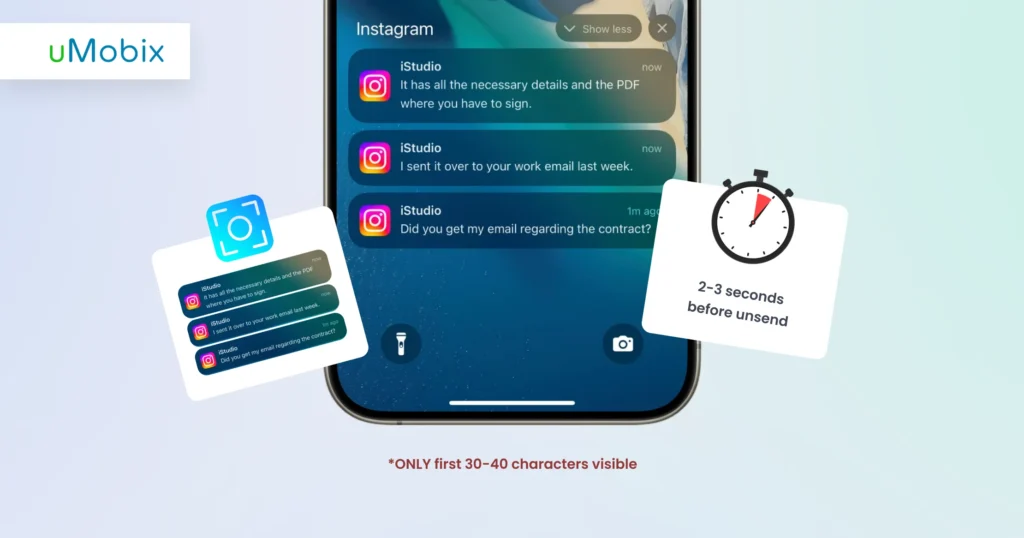
When someone unsends a message, Instagram performs an aggressive removal process designed to erase that content almost instantly. The sender simply holds the message and taps “Unsend”. Within a few seconds, the message disappears from both sides of the chat.
From a technical perspective, the message isn’t just hidden, it’s removed from Instagram’s active database. That’s why people searching “how to see unsent messages on Instagram” often discover there’s no built-in recovery button. The deletion happens quickly across both devices, wiping all the traces of the message.
For recipients, this produces no sign of the message. No preview, no recovery option, no archive.
This rapid execution is also why people ask whether you can see unsent Instagram messages after the fact. Once the removal is complete on the server side, Instagram no longer stores accessible copies for regular users. The only chance to retrieve unsent Instagram messages is during the brief window before deletion completes, or if monitoring captured the message earlier.
This instant removal is intentional. It not only supports privacy, but it also creates confusion, suspicion, and curiosity. That is why many users keep searching “how to know if someone unsent a message on Instagram” and whether an Instagram message unsent notification can reveal more than the app shows.
Unsend vs. Delete vs. Archive: What’s the Difference?
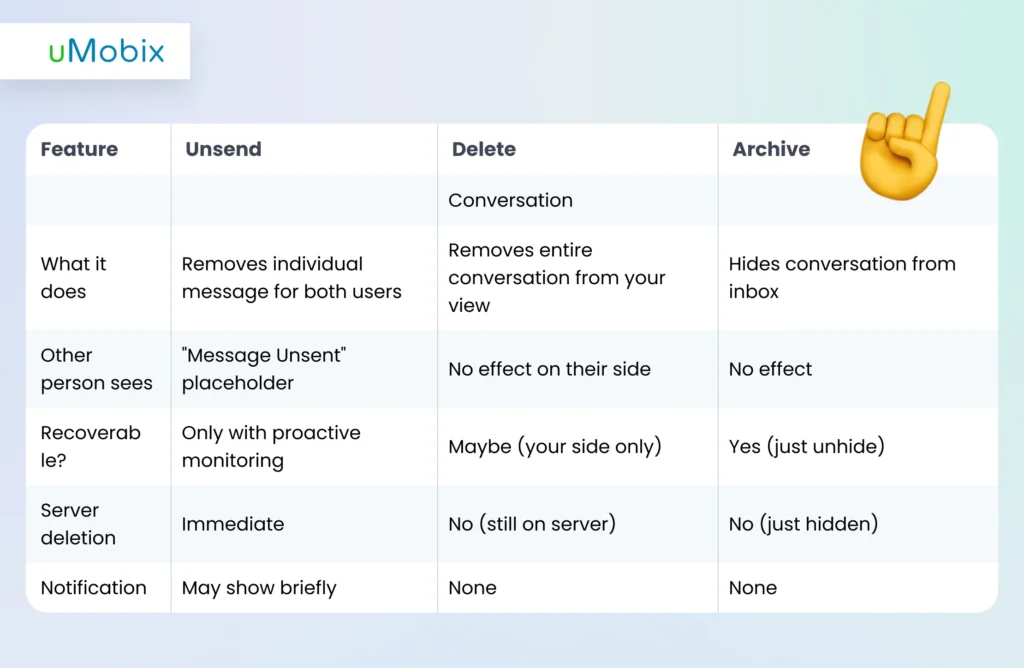
How to view deleted vs unsent Instagram messages? Understanding these differences helps prevent false expectations when trying to figure out how to see unsent messages on Instagram. Many users think all removed content behaves the same way, but Instagram treats unsend, delete, and archive very differently.
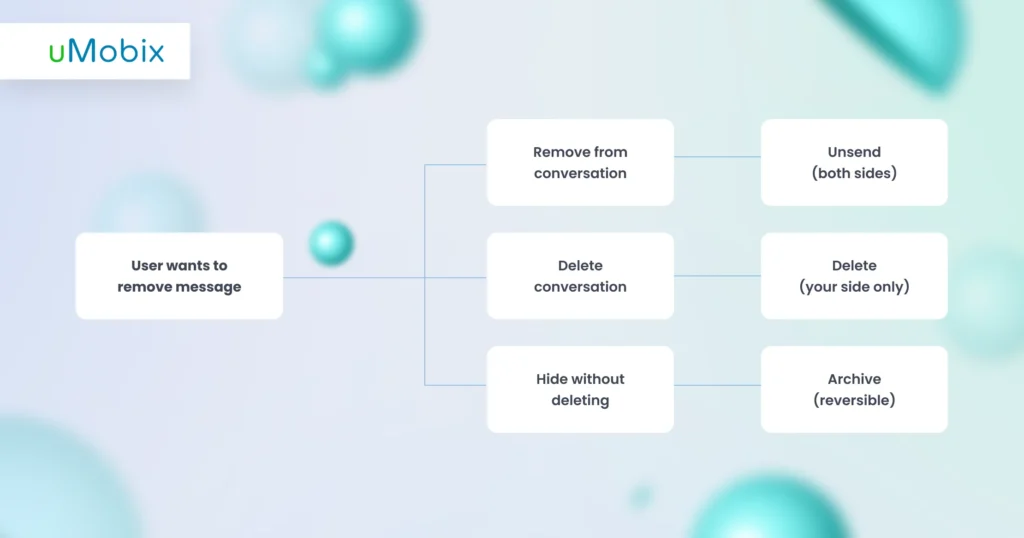
Unsend is the most aggressive action. When a sender taps Unsend, Instagram removes the message from both participants’ chat threads and clears it from user-accessible server records. This is why people searching for “can you see unsent Instagram messages or can you recover unsent Instagram messages” often become frustrated. Why is it so? Because the system is intentionally designed to make recovery impossible after deletion completes. Once unsent, the message no longer exists inside the normal Instagram interface.
By contrast, Delete only affects your own view of the conversation. The other person is still able to read your full message history.
The archive goes even further toward reversibility. It hides a chat without removing any content. Messages remain intact and can be restored instantly. So when someone looks for “how to view unsent Instagram conversations”, they’re not dealing with archived threads. They’re confronting server-level erasure.
This difference explains why learning how to know if someone unsent a message on Instagram matters. Unsent actions permanently remove visible content, so the only way to see unsent Instagram messages is to capture them before they’re deleted.
Can You See Unsent Instagram Messages? The Honest Answer
Here’s the honest reality: when it comes to how to see unsent messages on Instagram, timing is everything. Instagram removes unsent messages very quickly. Whether you can read it depends entirely on one thing: whether you caught it before it disappeared.
Before the message is unsent
- YES: If the monitoring software was already active. This is the most reliable way to see unsent Instagram messages, because the message is captured the moment it arrives.
- MAYBE: If you quickly take a screenshot of the lock-screen notification. You only have a few seconds, so speed matters.
- MAYBE: If an email notification saved part of the message preview. These previews are short and not guaranteed.
This tiny moment is the only real chance for people wondering can you see unsent Instagram messages to catch what was sent.
Can you see the message after it was unsent?
- NO: Instagram doesn’t provide any built-in recovery feature.
- NO: Data downloads won’t help restore unsent Instagram messages.
- NO: Third-party “recovery” tools cannot undo server deletion.
- NO: Once it’s gone, it’s truly gone.
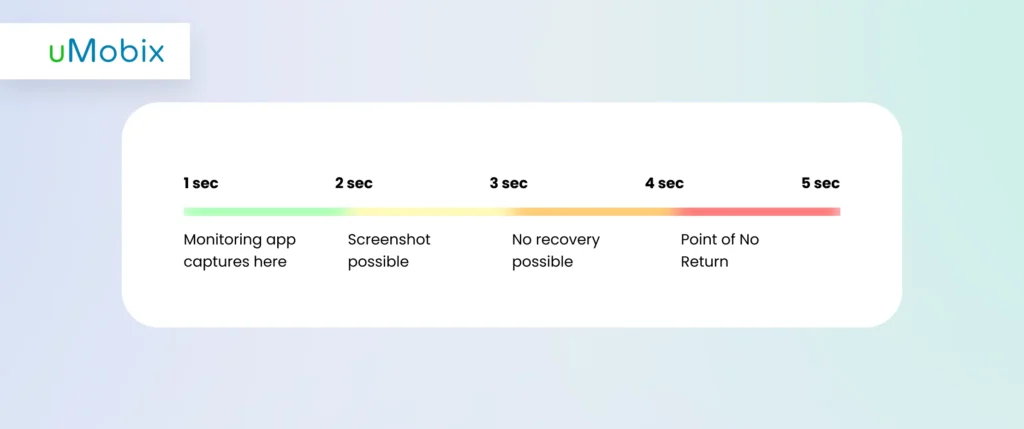
How does clicking the “unsent” button in Instagram work? Here, you must understand that every second matters, and that is how it looks:
- 0-2 seconds: notification appears
- 2-5 seconds: sender taps Unsend
- 5-10 seconds: Instagram removes the data
- 10+ seconds: recovery is no longer possible
That’s why many people searching can you recover unsent Instagram messages end up frustrated. The system is designed for fast removal. The only dependable solution is capturing messages before they vanish. That is how modern Instagram message unsent-notification-tracking tools work.
Why People Unsend Instagram Messages
People unsend Instagram messages for many reasons. Sometimes they send a message too fast and change their mind. They read it again, think that it was a mistake, and remove it.
Other times, they send the message to the wrong person and quickly unsend it to avoid confusion or unnecessary questions.
Some people unsend messages because they want to hide what they said. They may worry about reactions or arguments. This can make the other person curious.
When you see an Instagram message unsent notification, it feels like something important disappeared. Many people then search “how to read unsent Instagram DMs” or try to see unsent Instagram messages because they want to know what was said.
Often, unsending is harmless. A typing mistake, a joke that sounded off, or a message sent at the wrong time can make anyone want to take it back. It is a normal human reaction.
But if someone often unsends messages, it may raise questions or suggest unclear intentions. That is why it triggers a lot. So, how to see unsend messages?
Method 1: Instagram Monitoring Apps (MOST RELIABLE – 95% Success)
If your goal is how to see unsent messages on Instagram, you need to understand one important thing: once a message is unsent, Instagram removes it almost instantly. That means you usually cannot go back and recover it later. This is why many people search “can you see unsent Instagram messages” or “can you recover unsent Instagram messages”.
Monitoring apps solve this problem. Instead of trying to retrieve unsent Instagram messages after deletion, they record activity in real time. This is the key difference that makes unsent message recovery on Instagram possible.
How Monitoring Apps Capture Unsent Messages
Monitoring apps work quietly in the background of the device. When a message arrives, the software logs it immediately before Instagram processes an unsend command. This means even if the sender removes the message seconds later, a copy is already stored.
This happens through:
- Real-time interception – messages are captured as they appear
- Device-level logging – data is saved locally before server deletion
- Continuous monitoring – no gaps in message tracking
Because the capture occurs on the device, Instagram’s server-side deletion cannot erase what has already been recorded. This is why tools designed as an Instagram message unsend tracker can see unsent Insta messages when native Instagram cannot.
For people asking how to know if someone unsent a message on Instagram, monitoring logs clearly shows when the message appeared and when it was removed. You may even see an Instagram message unsent notification inside the app dashboard, along with the original text.
uMobix: The Leading Solution for Instagram Unsent Message Recovery
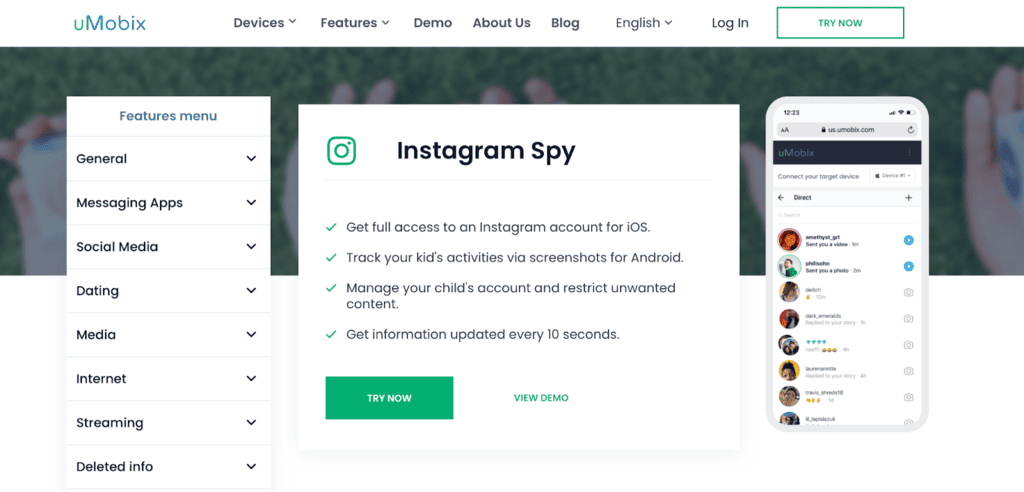
uMobix Instagram spy app is built specifically to capture disappearing content in real time. It focuses on Instagram activity, making Instagram DM recovery practical rather than guesswork.
Key features include:
- Screenshot unsend detection
- Complete message backup
- Real-time dashboard access
- Stealth background operation
When someone asks, “Can you see unsent Instagram messages?”, this is the type of technology that makes the answer YES, but only when installed beforehand.
The Leading Solution for Instagram Unsent Message Recovery
uMobix Instagram spy app is built specifically to capture disappearing content in real time.
Viewing Unsent Messages in the Dashboard
Once monitoring is active, reviewing deleted content is simple. The dashboard is designed so that even non-technical users can quickly find conversations.
How to see unsent messages on Instagram or how to see deleted messages on Messenger or any social media platform using uMobix? Here are the steps you have to follow:
- Install the app on the target device.
- Create an account inside the app.
- Open your dashboard.
- Check all the text messages (sent, received, and even those that were first sent and then unsent by the sender).
This makes how to see deleted messages on Instagram straightforward. Instead of guessing what disappeared, you see the full context. For families or professionals who need wider visibility, social media monitoring apps (like uMobix (supports Viber, Facebook, TikTok, Tinder, or Telegram spy or Snapchat spy monitoring) extend this protection beyond Instagram.
Method 2: Screenshot Lock Screen Notifications (LOW – 15%)
The idea behind this method is very simple. When someone sends you an Instagram message, your phone shows a preview on the lock screen. Usually, this preview contains the first one or two lines of the message. If the sender quickly presses “unsend,” the message disappears inside the app, but sometimes the notification preview stays for a moment.
The theory is that if you are fast enough, you can take a screenshot of that preview before it vanishes. In rare situations, this lets you see part of what was written, even after the sender removes the message. This is why some people try this trick when they want to see unsent messages on Instagram.
However, the reality is much less reliable. The time window is extremely small and often just a few seconds. Most people don’t notice the notification fast enough, unlock their phone in time, or take a screenshot before it disappears. Even if you succeed, you usually capture only a part of the message, not the full conversation.
Another limitation is phone settings. Some devices hide message previews for privacy, meaning nothing useful appears on the lock screen at all. Notification delays or system glitches can also prevent previews from showing.
Because of these issues, this method is mostly based on luck. It does not truly recover unsent messages; it only captures a brief preview if your timing is perfect.
Method 3: Android Notification History (MEDIUM – 30%)
Android phones have a hidden feature called notification history. On devices running Android 8.0 or newer, the system keeps a short log of recent notifications, even ones you cleared or dismissed. This log sometimes saves a preview of Instagram messages. Because of that, some people use it as a workaround when they want to see unsent Instagram DMs.
Here’s how it helps. When someone sends you an Instagram DM, your phone creates a notification preview. If the sender quickly unsends the message, the chat disappears inside Instagram. But the Android system may still keep that notification preview for a short time. When you open the notification history, you might see part of what was written.
It’s important to understand the limits. This log does not store full conversations. You usually see only a fragment, often a few words or a single line. Formatting can look messy, and media like photos, voice notes, or emojis won’t appear correctly. Sometimes nothing shows at all, depending on device settings or system cleanup.
Another challenge is timing. Notification history does not keep records forever. Older entries are removed automatically. If you don’t check quickly, the preview may disappear.
Because of these issues, Android notification history is not a true recovery method. It cannot fully restore unsent Instagram messages. It only gives a small chance to glimpse a preview before it’s gone. For people asking can you see unsent Instagram messages, this method is far from reliable.
Wanna know how to see someone’s iMessages? Click the link.
Method 4: Email Notifications (VERY LIMITED – 10%)
How to track someone on Instagram using email notifications? Instagram can send email alerts when someone sends you a direct message, but only if you turned this setting on before the message was unsent. You can enable it in “Settings”, “Notifications”, “Email Notifications”, and “Direct Messages”. Many people don’t activate this feature, so it only works if it was already set up.
When a message arrives, Instagram may send an email with a short preview. The subject line usually says something like “New message from (username)”. Inside the email, you might see the first 40-60 characters of the message. This preview is sometimes enough to understand the basic meaning.
However, there are strong limits. The email never includes photos, videos, voice notes, or stickers. It’s text only. If the sender quickly unsends the message, the link inside the email will no longer open the chat. It simply leads to nothing. You’re left with just the small preview that was already sent.
Because of this, email alerts do not provide true Insta unsent message recovery. They only capture fragments that happened to be delivered before the unsend action. Sometimes you get a clue about what was written. Other times, the preview is too short to matter.
For people asking if this method helps recover unsent messages, the honest answer is: it’s a tiny chance, not a dependable solution.
Method 5: Instagram Data Download (0%)
Many people believe Instagram’s Download Your Data tool can help them recover unsent messages. This idea sounds logical. After all, the feature promises a full archive of your Instagram activity. You can request it in “Settings”, “Security”, “ Download Data”, and Instagram sends you a file with your account information. Because it looks complete, people assume it must include everything – unsent messages.
But this is where the misunderstanding happens.
When someone unsends a message, Instagram removes it from its servers almost immediately. The deletion happens before Instagram prepares your downloadable archive. That means the message no longer exists in the system by the time your data file is created. Simply put: there is nothing left to download.
Your archive may still include regular chats, photos, account history, and settings. However, unsent messages are not stored there. They disappear completely once the unsend action finishes.
Some websites claim they can use Instagram data files to retrieve unsent Instagram messages. This is misleading. The data download feature was never designed for recovery, only for viewing stored account records. So while the tool is useful for backups, it does not help you recover unsent messages. Once they’re gone, they stay gone.
Can You Recover Unsent Instagram Messages After They’re Gone?
Short answer: No. Once someone unsends a message and Instagram finishes deleting it, there is no normal way to get it back. The system removes the message from both chats and from Instagram’s servers. If you did not capture or save it before that moment, it is gone for good.
Many people search for ways to retrieve unsent IG messages after deletion. It’s understandable because curiosity makes you want answers. But the reality is simple: Instagram does not keep a secret copy for users to restore later. The platform is designed to erase that content quickly and completely.
Why “Recovery Apps” Are Scams
You may see apps or websites promising instant IG unsent message recovery. These tools claim they can access hidden Instagram data. In reality, they cannot. Instagram does not provide erased message logs to third parties. Most of these services only try to collect logins, show fake scans, or ask for payment without delivering results.
The Only Exception: Law Enforcement
In rare legal situations, authorities may request stored data through official channels. This requires warrants and prior records. For regular users, this path is not realistic or available.
The Preventive Approach
Think of it like insurance. You must act before the loss happens. The only practical Instagram unsent message viewer method is monitoring that captures messages in real time. If nothing is recorded before deletion, recovery is not possible.
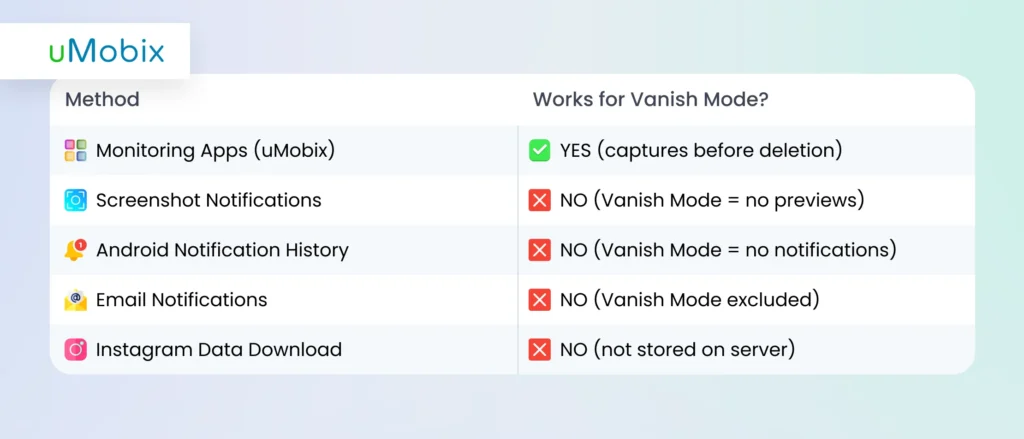
Unsent Messages in Vanish Mode: The Double-Disappearing Act
Before we start, let’s first explain to you what vanish mode is.
What Is Vanish Mode?
Vanish mode is an Instagram chat setting in which messages disappear automatically after the chat closes. It is designed for quick, private conversations. Once both people leave the chat, Instagram removes the messages from the conversation view. This already makes chats temporary, and when someone also uses the unsend feature, content can disappear even faster.
Extra Difficulty
When Vanish Mode and unsend work together, messages can vanish almost instantly. A sender can type something and then remove it before the other person has fully read it. Because Instagram deletes these messages at the app and server level, there is no built‑in recovery option.
Monitoring Capture
Here’s the good news: device‑level monitoring tools can capture messages before Vanish Mode erases them. These apps record activity in real time, so even if a chat disappears, the saved log remains available. The capture works the same way as regular message monitoring and keeps the full context, including timestamps. Some dashboards even mark conversations with a Vanish Mode indicator, making them easy to identify later. If you want to understand how discreet capture works, learn more about how to see someone’s Instagram messages without them knowing.
How to Know If Someone Unsent a Message on Instagram
Sometimes a message disappears, leaving you confused. Instagram does not send a clear warning when someone unsends a message. Many people look up how to know if someone unsent a message on Instagram because the app removes the text almost instantly. Still, there are small clues that can help you understand what happened if you pay attention.
Visual indicators include:
- “Message Unsent” placeholder: You may briefly see a system note showing that a message was removed.
- Notification mismatch: Your phone preview shows text, but when you open the chat, it is gone.
- Conversation gap: The flow of messages feels broken, like something is missing.
- Read receipt confusion: You remember seeing a message, but it no longer appears.
Why This Matters
Repeated unsending can sometimes reveal behavior patterns. A person may be hiding conversations from parents or partners, removing risky content, or changing what was said. In some situations, messages are erased to avoid consequences or create confusion. Knowing these signs helps you stay aware instead of second‑guessing what you saw.
Monitoring App Alerts: uMobix Unsend Detection
Monitoring tools record activity before messages disappear (regardless of whether you want to recover deleted WhatsApp messages, messages sent via Instagram, TikTok, Snapchat, or other social media platforms). These apps log timestamps, keep the original message content, and flag frequent unsending behavior. You can receive alerts when a message is removed, so you understand what happened instead of guessing. This creates a clear record, even when someone tries to erase a conversation.
How to See Unsent Messages on Instagram: Complete Method Comparison
This comparison shows why monitoring apps provide the most complete way to capture Instagram messages. A monitoring app records text, images, voice notes, and conversation context in real time. Notification methods only show short previews and disappear quickly, while data downloads don’t include unsent content at all. Monitoring also builds a secure, timestamped history that can be useful for documentation. The key difference lies in preparation: monitoring works continuously once installed, whereas other methods rely on luck. Always use these tools responsibly and within legal limits.
Legal and Ethical Considerations for Monitoring Unsent Messages
Monitoring Instagram messages, especially unsent ones, sits at the intersection of privacy, safety, and legality. Many people look for ways to see unsent messages on Instagram without thinking about what is allowed. The rules are not the same everywhere, but there are clear situations where monitoring is generally permitted and others where consent is required. Understanding these boundaries protects you from legal trouble while helping you use tools responsibly.
When is it legal to monitor Instagram messages? There are a few scenarios where monitoring is typically allowed:
- Parental monitoring of minor children. Parents usually have the right to supervise their child’s digital activity for safety reasons. This includes situations where parents want to know how to determine if someone unsent a message on Instagram to protect their child from risky communication.
- Company‑owned devices. Employers may monitor devices they own, but only when employees are clearly informed. Transparency is critical.
- Your own device backup. Capturing your personal Instagram data, including attempts to retrieve unsent Instagram messages, is generally permitted because you are monitoring your own activity.
Even in these cases, local privacy laws can vary, so checking regional regulations is important.
When do you need consent?
If you are trying to figure out how to view unsent Insta conversations belonging to another adult, consent is usually required. Monitoring a partner, friend, or coworker without permission can violate privacy laws. Even if your intention is harmless, unauthorized tracking may be illegal.
Note that even when it is legal, you must consider ethics. Legality does not automatically equal fairness. If you want to see unsent IG messages, ask yourself why. Monitoring should focus on safety, protection, or legitimate oversight, not control or curiosity. Ethical use means respecting personal boundaries, being transparent when possible, and avoiding misuse of any Instagram unsend message viewer technology.
Conclusion: The Reality of Viewing Unsent Instagram Messages
Here’s the hard truth: once a message is unsent, it’s gone. There is no secret backdoor, no hidden Instagram tool, and no miracle recovery method.
What actually works? How to see unsent messages on Instagram? It is using reliable monitoring tools like uMobix. Real-time monitoring ensures content is preserved before deletion, including vanished chats, media, and timestamps.
Ready to see unsent messages? Try uMobix with complete Instagram monitoring, including unsent message recovery, deleted stories, Vanish Mode messages, and more.
Latest posts
- How to Find Deleted Reels on Instagram: 5 Methods That Actually Work
- How to See Deleted Stories on Instagram: 6 Working Methods (2026)
- Facebook Location Tracker: How to Find Location by Facebook Account?
- Sign up for Spam Calls and Texts: Your Safety Guide
- Parental Emotional Abuse Test– 25 Questions to Identify Harmful Patterns


