Trying to learn how to find deleted Reels on Instagram can feel stressful. The reasons may be different: maybe you deleted it accidentally, or someone posted something and removed it quickly, so you’re curious and want to retrieve the lost information.
So the question of how to find deleted Instagram Reels may be what you search for. The honest answer is quick and simple: Instagram lets you recover your own deleted Reels for a short time, but if you want to see someone else’s deleted Reel, Instagram does not provide a built-in option.
According to Instagram rules, Reels are meant to stay online until someone deletes them. In 2026, Instagram still limits how long deleted content stays available.
Nevertheless, there are still ways you can use to find deleted Instagram Reels, how to see deleted stories on Instagram, or even more, how to see someone’s Instagram messages without them knowing? That is what we will tell you in this review.
Need to find deleted Instagram Reels of someone?
Try uMobix Instagram Monitoring tool today!
Can You Recover Deleted Reels on Instagram? Quick Answer
Many people ask, “Can you recover deleted Reels on Instagram?” The short answer: sometimes, depending on the situation.
Here’s how it works:
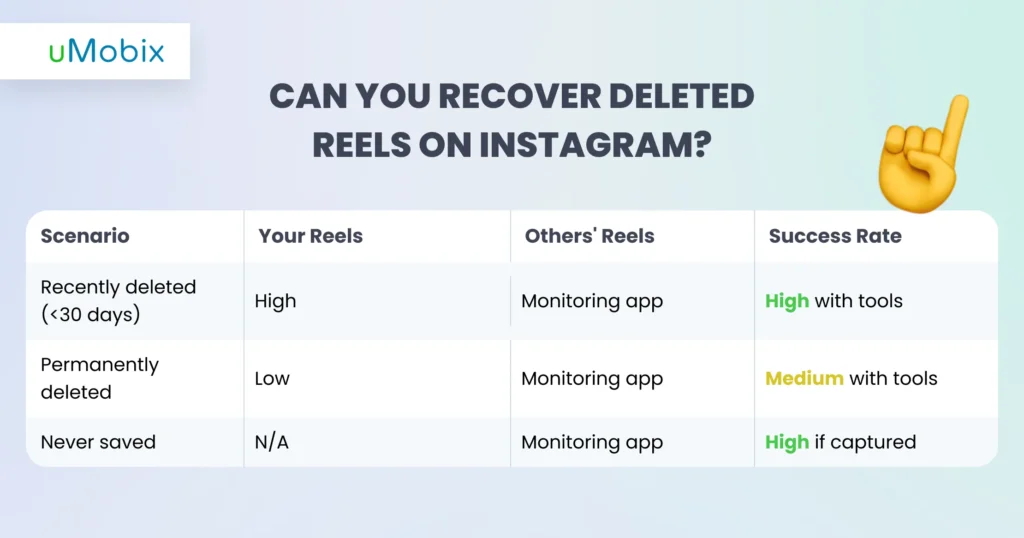
- Your own deleted Reels: You can recover your own deleted Reels within 30 days. Instagram keeps deleted content in a temporary folder. After 30 days or if you delete it permanently, it disappears.
- Someone else’s deleted Reels: You cannot recover someone else’s deleted Reels using Instagram. Once another person deletes a Reel, it disappears from the platform. The only way to see content like this is through a monitoring app that saves it before it gets deleted.
- Permanently deleted vs. archived: Archived content is still saved inside your account, so you can restore it anytime. Permanently deleted content is removed from Instagram and usually cannot be recovered. The key difference is that archived items are hidden, while deleted items are gone for good.
So when people search for how to recover deleted Instagram Reels or how to view deleted Reels, the key question is timing.
Why You Might Need to Find Deleted Instagram Reels
People look for deleted Reels for many real reasons:
Personal Content Recovery
You might delete a Reel mistakenly. Sometimes you remove a video because you shared personal information and worry that someone you do not want to see it may see it. Other times, you regret deleting creative work or a Reel that was getting a lot of attention. That’s when Instagram Reels recovery becomes important. Acting quickly can help you bring back content before it disappears, especially when the Reel still matters to you.
Others’s Deleted Reels Monitoring
Parents may want to see what their child posts and deletes, especially when videos disappear quickly. Teens sometimes share risky or very personal moments, then remove them when they panic or feel vulnerable. In relationships or business situations, sudden deletions can also raise questions. Having a great solution or tool for monitoring deleted Reels can be handy.
Legal or Professional Needs
Sometimes, a deleted video is important as proof. It could show what someone said, did, or promised. In work situations, businesses may need records of content that has been posted. This is when people try to retrieve deleted Instagram Reels. They are not doing it for curiosity; they need documentation. Deleted content can help explain misunderstandings, protect someone in a dispute, or keep official records.
Method 1: Instagram’s “Recently Deleted” Feature (Your Own Reels)
Instagram has an official tool to recover deleted content, but it only works for your own Reels, and it helps retrieve deleted instagram Reels you posted within a limited time after deletion.
How to Access Recently Deleted Reels
So, how can you recover deleted Reels on Instagram?
- Open your Instagram account.
- Tap on your profile picture at the bottom right corner and choose the menu icon (three horizontal lines.
- Go to Settings, “Activity”, and select “Your Activity”.
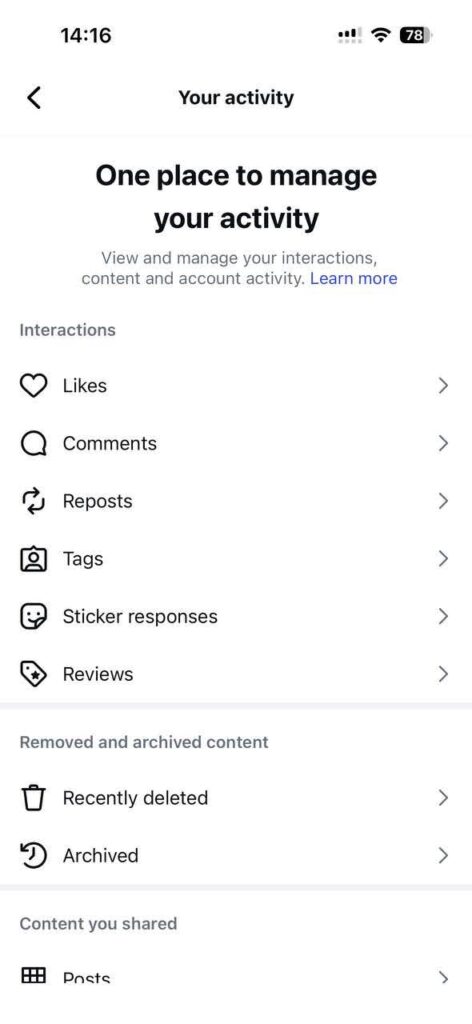
- Navigate to “Removed and archived content” and choose “Recently Deleted”.
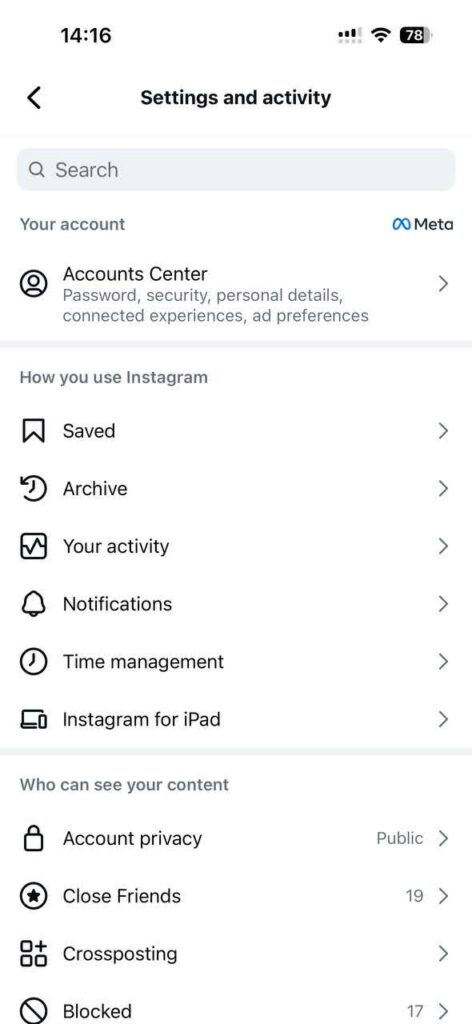
- Select your Reel and restore it.
This is the easiest way to restore deleted Instagram Reels, but only if you act quickly. Bear in mind when using this method:
- Instagram Reels recovery window is 30 days
- You can permanently delete content anytime
- Works only for your own account
Also, you cannot use this method to see deleted Reels Instagram users posted. It is personal recovery only.
Recently Deleted Feature Details
- 30-day recovery limit
- Permanent deletion possible anytime
- Account owner access only
Critical Limitations
Here are a few limitations you must consider:
- You cannot see others’ deleted Reels
- Reels have a 30-day time limit
- To retrieve deleted Reels, you must be the owner of the account
- It is impossible to access Reels if you are logged out
Method 2: Instagram Monitoring Apps (Most Reliable for Others’ Reels)
If you want to find deleted Instagram Reels from another account, social media monitoring apps are the only reliable method. These apps capture activity before content disappears. The best solution on the market is uMobix, as it is safe, legitimate, and easy to use and install.
How uMobix Captures Instagram Reels Before Deletion
Want to know how to track someone on Instagram or how to recover deleted Instagram Reels with uMobix? Well, uMobix works by saving Instagram Reel activity before anything disappears. When a Reel is posted or viewed on the monitored device, the app creates a real‑time backup. This means the video content is captured while it is still active, not after Instagram removes it. Because of this timing, deleted Reels can still be reviewed in the dashboard later.
How to recover deleted Instagram Reels with uMobix?
uMobix works by saving Instagram Reel activity before anything disappears
The system uses secure screen capture technology to record what happens inside Instagram. It logs the Reels your child or target user posts, watches, or interacts with. Even if someone deletes a Reel seconds later, the saved copy stays available. This helps parents or guardians understand behavior patterns instead of guessing what was shared.
Another important part is that the Instagram tracker app runs quietly in the background. It does not interrupt normal phone use or send visible alerts that could change behavior. Everything syncs automatically to your online control panel, where Reels are organized with timestamps for easy review.
What Gets Monitored
uMobix shows a clear picture of Reel activity, not just one small part. First, it records the Reels a person creates and posts. If they delete a video later, the saved copy remains because the app captures it immediately upon sharing the post.
The app also logs the Reels they watch and interact with. You can see which videos they like, comment on, or share. These small actions can say a lot about interests and online behavior. Saved or bookmarked Reels are included too, so you know what content they want to come back to later.
Draft Reels are another useful piece. Sometimes people start making a video but never post it. Monitoring drafts lets you understand what they planned to share. Finally, engagement metrics such as likes, comments, and shares help you understand how they connect with others.
What’s more? The app comes with over 40 tracking features, including:
- Photo and video tracker
- Social media monitoring (over 12 apps are tracked, including FB, Twitter, TikTok, and Snapchat app monitoring tools)
- Location tracking
- Web browser checking and the other Instagram parental controls features
Wanna know how to see deleted messages on Instagram? uMobix will also help with it. How to see secret conversations on Instagram? Follow the same steps as discussed above.
Set Up Process for Instagram Reels Monitoring
So, how to see deleted Reels on Instagram with uMobix? Setting up Instagram Reels monitoring is simple when you follow the steps in order.
- First, you subscribe to the monitoring service and create your account. This provides you with access to your personal dashboard, where all captured activity will appear.
- Next, install the app on the target Android device. The setup wizard guides you step by step, so you don’t have to guess what to do. Once installed, open the settings and turn on Instagram tracking. This allows the app to automatically start recording Reel activity.
- After setup, log in to your web dashboard from any device. Here you can check out the Reels archive, where videos are organized by time and activity. You’ll see both current Reels and ones that were deleted later, because the app saves them early.
- From this dashboard, you can view everything remotely without needing to touch the monitored phone again.
Why This Is the Only Way to See Others’ Deleted Reels
This method works because it saves Reel content before Instagram removes it. Once a Reel is deleted, Instagram does not retain a public copy, so standard tools cannot restore it. A monitoring app captures video early, so you can still view it later.
It works no matter what privacy settings are used. Public, private, or archived Reels can still be recorded when they appear on the device. There is no strict time limit, because the copy is stored outside Instagram.
Method 3: Instagram Data Download (Limited Help)
Instagram offers a built‑in data download tool, but it mainly helps you access your own account information. It can include some Reel details, yet recovery of Instagram Reels is slow and incomplete. This method has strict limitations and does not allow you to see deleted Reels from other people.
How to Download Your Instagram Data
Instagram lets you request a copy of your account data. This can include information about your Reels, posts, and activity.
So, how to see deleted Reels on Instagram using this method?
- First, open Instagram and go to “Settings”, tap “Security”, then choose “Download Data”. Instagram will ask for your email address.
- Select a format, JSON or HTML. HTML is easier to read, while JSON is more technical.
- Once you send the request, Instagram prepares your file. This can take up to 48 hours, sometimes less.
- When it’s ready, you will receive an email with a download link. Tap the link and save the file to your device.
- You may need to unzip or extract the folder to open it. Inside, you will see organized files with your account information.
Remember, this download mostly shows data from your own account, not other people’s deleted Reels.
What You’ll Find (and Won’t Find)
When you download your Instagram data, you get a record of your own activity. You will usually find a list of Reels you posted, though the actual video file is not always included. You’ll also see metadata, which means details like captions, dates, and sometimes locations. Another part of the file shows engagement data, such as likes, comments, and shares on your posts. This helps you review how your content performed.
However, there are important limits. The download does not include other people’s deleted Reels. It may also miss video files from older Reels, especially if they were removed long ago. You won’t get real‑time access, because the file is just a snapshot from when you made the request. Finally, it doesn’t show Reels you only watched but didn’t post. So while this tool is helpful for personal records, it is not a full recovery solution.
Why This Method Falls Short
This method sounds helpful at first, but it has clear limits. The biggest issue is the 48‑hour delay. You must wait for Instagram to prepare the file, so it’s not useful when you need something quickly. The download also works only for your own account, which means you cannot use it to see or recover someone else’s deleted Reels.
Another problem is that the file may not include the real video clips. Sometimes you only get text details instead of the actual media. It also doesn’t contain deleted Reels from other people, even if you viewed them before. Finally, the data comes in a complex format that can feel confusing if you’re not used to working with files like JSON or HTML.
Method 4: Google Photos/iCloud Auto-Backup (If Configured)
Cloud backups can save Reels only if you store them on your phone first. If backup was enabled before deletion, you might find copies in your photo storage. Well, how to recover deleted Instagram Reels using each of these methods?
How Auto-Backup Might Save Your Reels
Auto‑backup can sometimes save your Reels, but only if it was turned on before you deleted anything. On Android, Google Photos may automatically upload videos stored in your camera roll. On iPhone, iCloud Photos can do the same. This works when a reel is first saved or drafted on your device, not just when it’s posted on Instagram. If backup was active, you might find the video in your cloud library. Without prior setup, there’s nothing to recover.
Checking Your Cloud Storage
To see if your Reels were saved, check your cloud storage. On Android, open the Google Photos app, go to “Library”, and look for an Instagram folder – your videos may be there. On iPhone, open the “Photos” app, go to “Albums”, “Recently Deleted” (videos stay up to 30 days). You can also check iCloud.com, “Photos” to see if your Reel is stored in the cloud. Remember, this only works if auto-backup was turned on before you deleted the Reel.
Why This Is Unreliable
This method is not very reliable because it only works if you set up a backup before deleting the Reel. It saves only Reels that were already saved to your camera roll, so direct Instagram posts might be missed. You cannot access other people’s Reels this way. Also, whether your videos are backed up depends on your cloud storage settings. If auto-backup is off or storage is limited, your Reels may not be saved at all. So, while cloud backup can help, it is not a complete solution for recovering deleted Reels.
Can You Recover Deleted Reels on Instagram? Technical Explanation
Instagram deletes Reels in two stages: first, moving them to a temporary Recently Deleted storage, then permanently removing them from its servers after the retention window ends. Recovery is only possible while a copy still exists either in that temporary folder or in an external backup captured before deletion.
How Instagram Reels Deletion Works
When you delete a Reel, Instagram doesn’t erase it instantly. First, the content is moved to the Recently Deleted folder, where it stays for up to 30 days. During this time, you can restore it if you change your mind. After those 30 days or if you choose permanent deletion right away, the Reel is removed from Instagram’s servers. Once this happens, Instagram no longer keeps a usable copy. That’s why recovery becomes almost impossible.
Why Monitoring Apps Succeed Where Others Fail
Monitoring apps work differently because they capture content before Instagram deletes it. They use local device caching and real‑time screen capture to save what appears on the device. This creates an independent copy that isn’t controlled by Instagram’s deletion system. Since the content is preserved early, it can still be viewed later even after the Reel disappears from Instagram.
How to View Deleted Reels Someone Else Posted
Before jumping into the H3 sections, it’s important to note that viewing deleted Reels from someone else is not easy. Instagram’s own tools only work for your account, so any attempt to see others’ deleted content requires preparation and the right tools.
Why You Can’t Use Instagram’s Features
Instagram does not let you see someone else’s deleted Reels. The Recently Deleted folder only works for the account owner. This means you can recover your own content, but not content from another person. Instagram is built this way to protect privacy. Once someone deletes a Reel, it disappears from public view. There is no hidden menu or official option to look it up later.
The Only Working Solution: Monitoring Apps
To see deleted Reels from another account, monitoring software must be installed before the Reels are deleted. These apps capture Instagram activity in real time. The content is saved to a private dashboard you can open remotely. Even if the Reel is deleted later, the saved copy stays available.
Use Cases for Monitoring Others’ Deleted Reels
People use monitoring to protect children, check risky behavior, or oversee company devices. It can also help creators keep backups. A trusted parental control app can support safe and responsible monitoring.
Instagram Reels Monitoring for Parents
Parents need ways to keep their children safe while still respecting their privacy. Monitoring tools help strike that balance by providing insight into activity without constant interference.
Why Parents Need to Monitor Reels Activity
Teens post Reels all the time, and some videos can be inappropriate or risky. Peer pressure can push them to join dangerous challenges or share content they later delete. Monitoring helps parents spot these risks early and protect their children from harmful trends, unsafe pranks, or exposure to inappropriate content.
What Parents Can See with Monitoring Apps
Monitoring apps allow parents to see all Reels their child posts, even deleted ones. They can track which Reels are watched or interacted with, time spent on Reels, accounts followed, comments, messages, and bookmarked content. This gives a clear picture of online activity without invading privacy too much. Kids safety on Instagram matters.
Having “The Talk” About Instagram Reels
Parents should explain why monitoring is in place. Setting boundaries, teaching about digital footprints, and building trust help teens understand the importance of online safety.
How to Recover Deleted Instagram Reels on iPhone vs. Android
Before choosing a recovery method, it helps to know that iPhones and Androids handle deleted files a bit differently. Both platforms support Instagram’s built‑in recovery, but their backup systems and storage access are not the same. Understanding these differences can save time and prevent false expectations. So, how to find deleted Reels on Instagram on iPhones and Android?
iPhone‑Specific Recovery Options
On iPhone, the first place to check is Instagram’s Recently Deleted, which works the same on all devices. If iCloud Photos was turned on before deletion, you might also find saved Reel drafts in your cloud storage. Monitoring apps can be installed to back up activity going forward, but iOS security limits deep file recovery. Once a Reel is permanently removed and not backed up, recovery options become very limited.
Android‑Specific Recovery Options
Android users also start with Instagram’s Recently Deleted folder. If Google Photos auto‑backup was active, saved Reel files may appear there. Android allows file recovery apps, but success rates are low and depend on timing. Monitoring apps often work more flexibly on Android because of broader system access. In rare cases, SD card storage can help recover media, but only if the file was saved locally first.
Can Permanently Deleted Instagram Reels Be Recovered?
So, how to find deleted Reels on Instagram? Can it be recovered? Once a Reel is permanently deleted after 30 days or immediately removed, it cannot be recovered from Instagram’s servers. On your own device, data recovery tools might work, but the results are often unreliable. For someone else’s device, recovery is only possible if a monitoring app was installed beforehand.
How to Restore Deleted Instagram Reels: Step-by-Step Guide
This guide combines the main recovery options so you can act fast and choose the right path.
For Your Own Deleted Reels
First, open Instagram and check Recently Deleted. This works only within the 0-30-day window. If the Reel isn’t there, look in your cloud backups, such as Google Photos or iCloud. You can also request your Instagram Data Download to see what files or metadata are available. As a final step, you may try device data recovery software, but success is not guaranteed.
For Someone Else’s Deleted Reels
Confirm that a monitoring app was installed and properly configured before deletion. Open the monitoring dashboard and go to the Instagram Reels section. There, you can view archived or deleted Reels captured earlier. Download or save any important content right away to keep a permanent copy.
Legal and Ethical Considerations
Monitoring Instagram Reels comes with important legal and ethical responsibilities. You need to understand when it is allowed and when consent is required.
When It’s Legal to Monitor Instagram Reels
It is generally legal to monitor content on your minor children’s accounts. You can also monitor company-owned devices if employees are informed. Additionally, you may access your own devices for backup or recovery purposes.
When Consent Is Required
Monitoring the devices of adult partners, spouses, or other adults usually requires their permission. Some states have strict two-party consent laws, meaning both parties must agree before any monitoring occurs.
Instagram Reels vs. TikTok: Recovery Differences
Instagram Reels and TikTok handle deleted content differently. Reels go to “Recently Deleted” for 30 days, while TikTok drafts and deleted videos have separate recovery rules. TikTok’s deleted content policies and monitoring tools differ from Instagram’s, and TikTok offers limited third-party tracking options. Cross-platform monitoring is possible with some apps, but capabilities vary. Understanding these differences helps users choose the right recovery or monitoring method for each platform.
Alternatives: Monitoring Other Social Media Content
If you want social media monitoring beyond Instagram, several social media platforms can be monitored with similar tools. Apps like TikTok, Snapchat, and Facebook allow proactive oversight when installed correctly. Monitoring helps parents ensure child safety, businesses track company devices, or users back up important content. Each platform has unique privacy settings and limitations, so using specialized monitoring apps is the most reliable way to see deleted or hidden content while staying within legal and ethical boundaries.
Conclusion
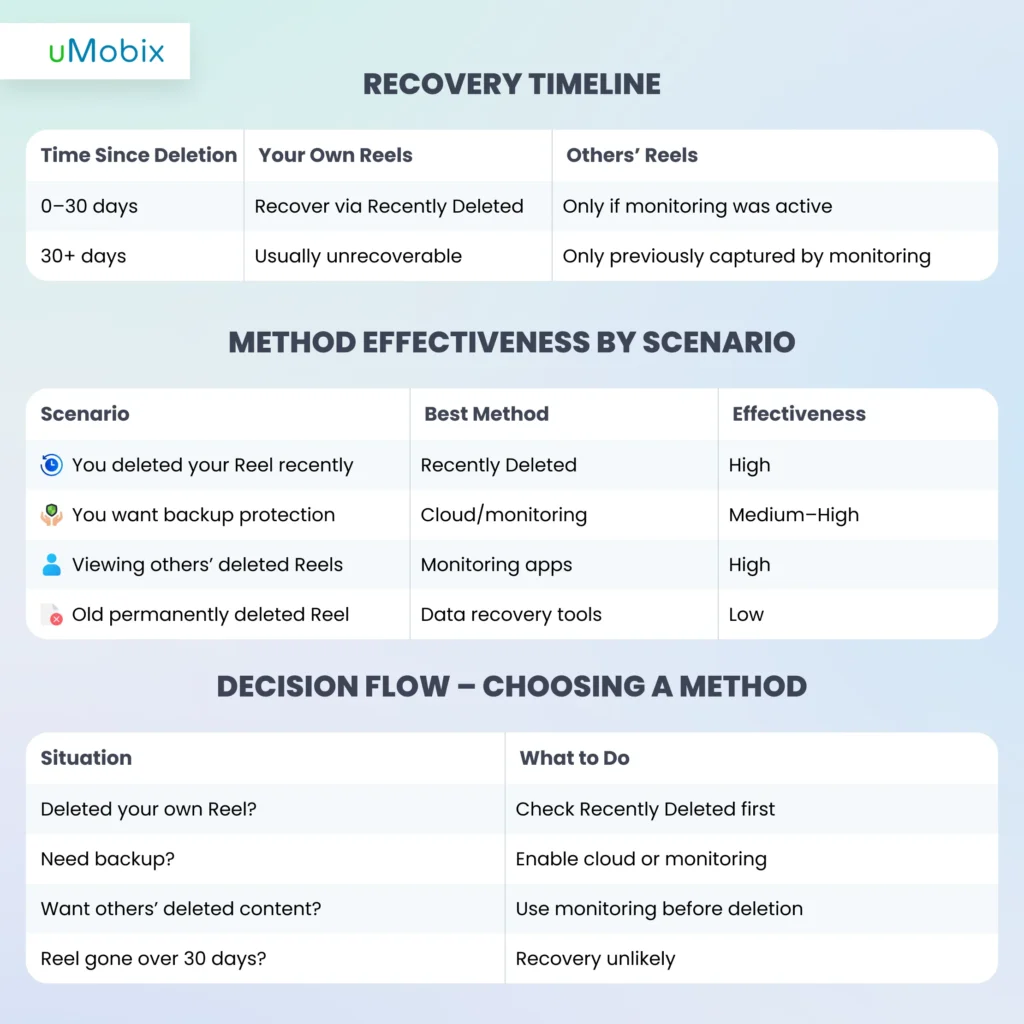
Recovering deleted Instagram Reels depends on whose content you want to recover. For your own Reels, Instagram’s Recently Deleted feature works for 30 days, letting you retrieve deleted Instagram Reels quickly. For others’ Reels, monitoring apps like uMobix are the only reliable way to capture and view deleted or expired content. Third-party downloaders and cloud backups have limited use and are subject to strict conditions. Always keep realistic expectations. Permanently deleted Reels may be unrecoverable. Use monitoring responsibly and legally, especially for children or company devices.
Try uMobix Today to safely recover deleted Instagram Reels!
FAQ
Instagram keeps deleted Reels in the “Recently Deleted” folder for 30 days. After that, they are permanently removed from servers and cannot be recovered through normal account features.
No, after 30 days, Instagram permanently deletes Reels from its servers. Recovery is only possible from personal backups or if monitoring apps captured the content before deletion.
No, Instagram does not notify users if someone saves their Reel. Saves are private, and content can only be seen by the saver in their collections.
Once a Reel is deleted, Instagram removes all viewer data. You cannot see who watched it after deletion, as this information is no longer stored.
Signs include unknown apps on your device, unusual battery drain, spikes in data usage, or slower performance. Checking installed apps and device permissions can reveal monitoring activity.


Latest posts
- How to See Deleted Stories on Instagram: 6 Working Methods (2026)
- How to See Unsent Messages on Instagram: 5 Proven Methods (2026)
- Facebook Location Tracker: How to Find Location by Facebook Account?
- Sign up for Spam Calls and Texts: Your Safety Guide
- Parental Emotional Abuse Test– 25 Questions to Identify Harmful Patterns