


Have you ever wondered what someone really wanted to hide on Instagram? Maybe it was a fleeting thought, a secret moment, or a post they regretted instantly. How to see deleted stories on Instagram isn’t just a question. It is something every person has at least once desired to access in their life.
As you know, stories disappear quickly, either after 24 hours or when someone, for some reason, decides to delete them. The truth is, you can only easily access your own past stories through Instagram’s archive. Other people’s deleted stories? No, if you do not use the right third-party downloaders, you can help you catch a story in time.
In this review, we’ll show you exactly what works, what does not, and how to retrieve deleted Instagram stories or catch them before they disappear, so you never miss a moment again. So, how to look at someone’s Instagram without them knowing, see the expired stories or even the other deleted content anonymously and risk-free? Whether you’re trying to recover memories, protect your kids online, or understand a friend’s behavior, knowing the rules and methods will be in handy.
Can You See Deleted Instagram Stories? The Truth
Sometimes, but context matters. When people ask, “Can you see deleted Instagram stories?”, they’re usually mixing up three different cases:
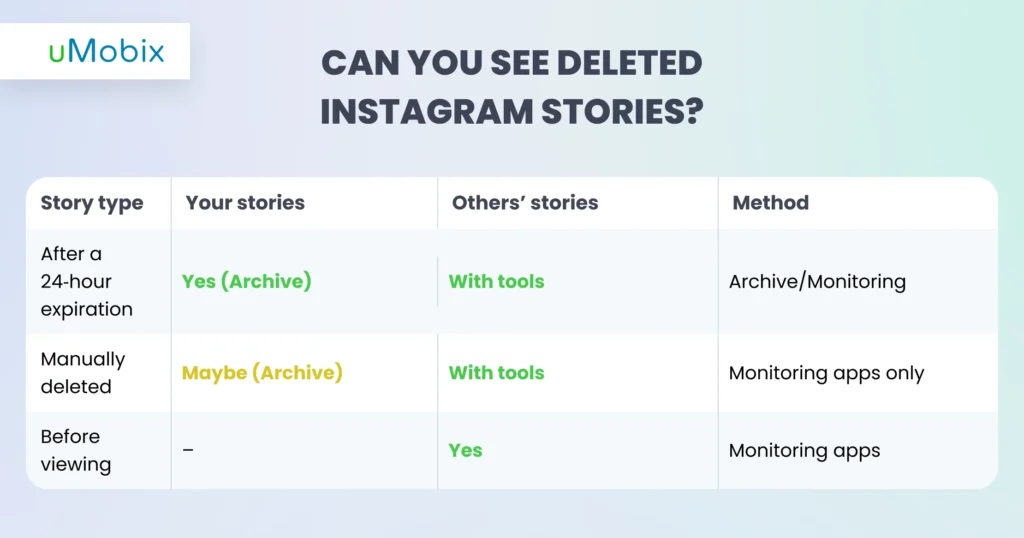
If it’s your own story, Instagram saves it in your archive (for this, check if this feature is turned on in your account settings). That means you may be able to recover deleted Instagram stories you posted yourself.
If it’s someone else’s story, things change fast. Once Instagram removes it from their servers, it’s gone, unless it was captured before deletion. That’s why timing matters so much when trying to view someone’s deleted Instagram story.
Why View Someone’s Deleted Instagram Stories?
There are different reasons a person may need or want to view someone’s deleted IG stories, but most reasons people search for how to watch deleted Instagram stories are surprisingly practical.
Parental Monitoring
On social media platforms like Instagram, stories disappear quickly, so parents can miss something important if they do not check their kids’ newly posted stories immediately. For this reason, many parents use parental monitoring apps. Seeing what content a child posts helps parents spot risky trends, oversharing, or emotional signals that might otherwise vanish. Captured deleted stories can reveal behavior changes or moments of peer pressure that may require your immediate intervention.
Trust and Relationship Concerns
Deleted stories can raise questions in friendships, partnerships, or families. Sometimes content disappears for harmless reasons, but there are reasons it disappears purposely, and you have a lot of questions requiring immediate answers. Understanding why something was removed can prevent misunderstandings and unnecessary conflict. Viewing content shared with limited audiences or noticing hidden story activity gives a fuller picture of communication dynamics. Tools like uMobix provide visibility that supports honest conversations, not accusations. The goal isn’t catching someone. It’s reducing suspicions and quarrels, so relationships rely more on clarity and understanding.
Content Recovery
In stories, people often share some content they do not want to be saved in their album. For most, it can be something insignificant, while for others it can mean a lot. Thus, when a story disappears, it feels like a missed opportunity. Luckily, Instagram story recovery tools help preserve important posts before they vanish. For brands, this means backing up marketing content, tracking engagement experiments, or reusing creative assets, while for individuals, it means saving memories that matter.
So, how to watch deleted Instagram stories? That is what you will find below.
Method 1: Instagram Story Monitoring Apps (Most Reliable)
Wanna know how to see deleted stories on Instagram? For most people, monitoring apps are the only consistently reliable option because they capture content before it disappears. One of such Instagram monitoring apps is uMobix – a great parental monitoring solution trusted by many worldwide.
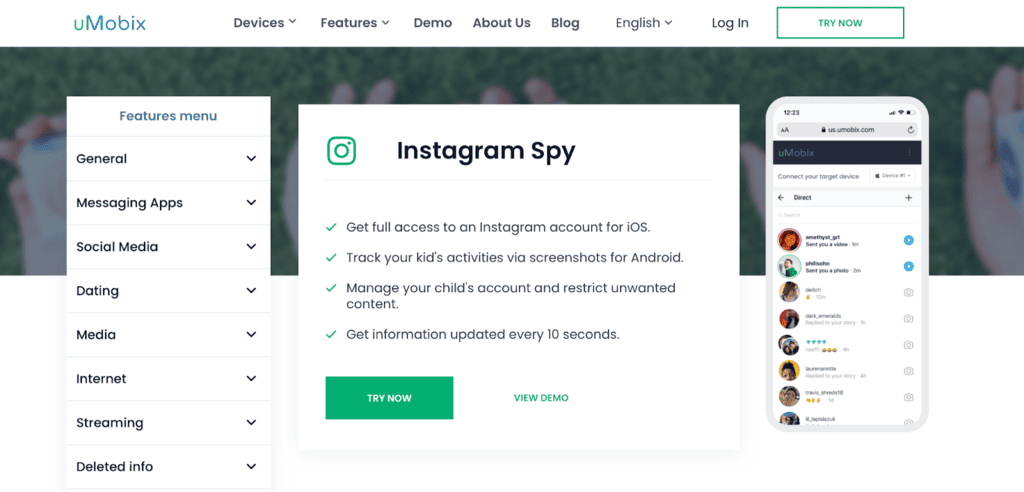
How uMobix Captures Instagram Stories Before Deletion
Can you see deleted Instagram stories? Yes. Instead of trying to recover stories after they disappear, uMobix works proactively – it captures them as they are posted. It can recover deleted Instagram stories. When a story appears inside Instagram on the monitored device, the parental control app takes real‑time screenshots the moment the content loads. This means posts are preserved exactly as they were viewed, including visuals and timestamps.
Those screenshots are then automatically saved to a secure dashboard long before Instagram’s 24‑hour expiration window kicks in. Even if the story is manually deleted minutes later, the captured version remains accessible. Best thing? All of this runs quietly in the background on the monitored device.
What Gets Captured?
When monitoring is active, the app builds a timeline of story activity so you can understand context, not just isolated moments.
First, it can recover deleted Instagram stories and record stories that the person posts. Every visible frame is captured as it appears, preserving what was shared even if it’s later deleted or expires. Beyond visuals, the app tracks replies and interactions connected to stories. If someone responds to or engages with the monitored user’s content, you will be reported immediately. Finally, the app shows detailed timestamps of every activity, so you can see when and with whom these interactions happen.
Want to know how to see what someone likes on Instagram? With uMobix, it is as easy as ABC. You will be able to see who likes your target’s stories and posts most often, which is highly useful for deflecting infidelity in relationships or Instagram scams that may hurt your loved ones.
If you think that Instagram parental controls are all the features uMobix offers, you are mistaken. Here are the other benefits of trying this application:
- Real-time location tracking
- Web browser history checking
- Social media monitoring – over 12 platforms involved, including Facebook Messenger, WhatsApp, Tinder, TikTok, Kik, Skype, Line, and Snapchat spy app tracking
- Calls loggings
- SMS reading
- Access to deleted data
- Keylogging
- Video and photo viewing, and much more.
Set Up for Instagram Story Monitoring: Step-by-Step Process
So, how to see deleted stories on Instagram or how to track someone on Instagram with uMobix? Start by installing the monitoring app on the target Android device. This grants the software permission to observe local activity. During setup, you grant the access needed for media capture and background operation, so the app can work reliably.
Next, enable Instagram tracking inside the app settings. This activates story monitoring specifically, telling the app to watch for new story activity in real time.
After setup, you open the secure dashboard archive from your own device. This is where captured story data is organized into a timeline view. From there, you can see expired Instagram stories remotely.
Interested in how to see someone’s Instagram messages without them knowing or how to see deleted messages on Instagram? Just follow the same steps. All the necessary data will be displayed in your user space right after the app is set up on the target device.
Method 2: Instagram Archive Feature (Your Own Stories Only)
If you’re trying to recover something you posted, the Instagram story archive is the only built‑in tool that keeps your expired stories automatically. It doesn’t show other people’s content, but only for your own posts.
How to Access Your Instagram Story Archive
How to see deleted stories on Instagram using the Instagram story archive? Open Instagram and go to your profile, tap the “Menu”, then choose “Archive”, “Stories”. You’ll see your past stories arranged by date, making it easy to scroll back through time.
From there, you can repost a memory, save media to your device, or restore a story to your highlights if you want it visible again.
Critical Limitations
The archive is strictly personal. It only stores stories you posted, not anything from friends or accounts you follow. If archive saving wasn’t turned on before posting, that story is gone once deleted.
Most importantly, this feature cannot recover or display other people’s expired or deleted stories. It’s a private storage system, so it won’t help if you’re trying to view someone’s deleted Instagram story.
Method 3: Third‑Party Story Downloaders (Limited Effectiveness)
Third-party story downloaders let you download public stories while they’re still active, often through websites or browser extensions. They can be handy if you want to save a friend’s public story before it disappears, but they have clear limits.
First, they cannot access private accounts or Close Friends stories. If the story has already expired or been deleted, these tools cannot retrieve it. So you cannot see expired Instagram stories.
There are also security concerns. Some downloaders may request unnecessary permissions or ask you to log in, which can put your account at risk.
Well, how to view deleted Instagram stories using third-party downloaders?
How Story Downloader Tools Work
And here you may also ask: how to see deleted stories on Instagram with story downloader tools? Story downloader tools act like quick capture utilities. When someone posts a public Instagram story, the tool pulls a temporary copy of that media from Instagram’s web version and lets you save it to your device. Some work through websites where you paste a username, while others are browser extensions that add a download button when you view someone’s deleted Instagram story.
These tools only access content that is still live. Once the 24‑hour window closes or if the creator deletes the story, the file is no longer available to fetch. They don’t break Instagram’s storage system or recover erased media. They simply grab what is currently visible.
Major Limitations
The biggest limit is access. Most story downloaders work only with public accounts, so private stories or Close Friends content are out of reach. They also can’t bring back stories that already expired or were deleted. If you don’t catch them in time, they’re gone.
Reliability is another issue. These tools can fail when Instagram updates its system. Most of them also request logins or permissions that could compromise your privacy and anonymity. There’s no automation either. You have to watch stories yourself and download them manually, which takes time and attention. In short, they can work, but with limitations, and not always when you need them.
Popular Story Downloader Tools
StorySaver
StorySaver is one of the more recognizable browser‑based downloaders. How to view deleted Instagram stories with StorySaver? You paste a public username, and if a story is active, the tool lets you save a copy. It’s simple and fast, but it only works for public IG accounts and when the story is still visible.
InstaStory
How to view deleted Instagram stories using this app? InstaStory works similarly to Story Saver. It scans active public stories and gives you a temporary download option. It’s convenient for one‑off saves, but availability can be inconsistent when Instagram changes its backend. Users often report pop‑ups or aggressive advertising. The biggest limitation remains timing. Once the story expires or is deleted, InstaStory cannot recover it.
4K Stogram
4K Stogram is a desktop application that allows batch downloading of public content, including stories, posts, and highlights. While more powerful, it may trigger Instagram rate limits or account warnings if used heavily.
Important note: All story downloader tools operate in a gray area of reliability and security. They only capture content that is currently public and active; they cannot restore deleted stories.
Method 4: Instagram Data Download (Partial Solution)
Instagram offers an official data export feature that lets you download a copy of your account information. It can be useful for reviewing your own activity history, yet it does not function as a true solution for those who want to see expired Instagram stories. But how to view deleted Instagram stories using the Instagram data download?
Requesting Your Instagram Data
To request your data, open Instagram and go to “Settings”. “Security”, “Download Data”. You’ll enter your email and confirm your identity. Instagram then prepares a downloadable archive, which can take anywhere from a few hours to about 48 hours, depending on account size.
Why This Doesn’t Solve the Problem
This export only contains your own account data, not content from other users. That means it cannot show someone else’s deleted or expired stories.
There’s also a major time delay. By the time your archive is ready, a deleted story is long gone. Instagram does not preserve a visual backup library of every story you ever viewed. In short, it’s informative, but it won’t help you retrieve or watch deleted stories from others.
Method 5: Screen Recording (Proactive Only)
Screen recording is the most straightforward way to keep a copy of an Instagram story, but it only works if you act before the story disappears. This method doesn’t recover deleted content. Instead, it’s a manual, preventive approach that requires you to notice a story in time and record it yourself.
How to Screen Record Instagram Stories
Both major mobile platforms include built‑in screen recording tools. On iOS, open Control Center and tap the screen recording icon before viewing the story. Once the recording starts, open Instagram and watch the story normally. When finished, stop recording – the video saves to your Photos app.
On Android, swipe down to access “Quick Settings” and select “Screen Record” (wording may vary by device). Start recording, then view the story. The file saves to your gallery.
You must record before the story expires or is deleted. Once it’s gone, screen recording can’t bring it back.
Disadvantages
This approach has clear limits. You have to constantly watch for stories you might want to save, which isn’t realistic for most people. It’s time‑consuming and offers no automation, meaning every recording must be done manually. Can you see deleted Instagram stories? No, as it cannot retrieve already‑deleted stories. In some situations, recording someone’s content without permission could conflict with platform rules or expectations. Screen recording is simple, but it’s more of a temporary workaround than a reliable long‑term solution.
Method 6: Browser Cache Recovery (Technical, Low Success)
Browser cache recovery is a highly technical workaround that attempts to pull temporary Instagram story files stored on a device. It’s aimed at advanced users who understand file systems and Instagram story recovery tools. Even then, success is unpredictable. This method only has a chance of working if the story was viewed very recently and the cached data hasn’t been overwritten.
Accessing Instagram Cache Files
When you view a story, fragments of media may be temporarily saved in your browser or app cache. In theory, you can search those folders to locate recoverable files. The challenge is that cache storage locations vary by platform and browser. On desktop systems, cached files sit inside hidden directories tied to the browser. On Android devices, cached Instagram data lives in protected app folders that may require special permissions to access.
Why This Rarely Works
Cache data is designed to be temporary. Devices routinely clear cached files to free storage, sometimes within minutes. Instagram media may also be encrypted or split into segments that are difficult to reassemble.
Also, if you don’t act immediately after viewing the story, the data is likely gone. Even with fast action, success rates remain low.
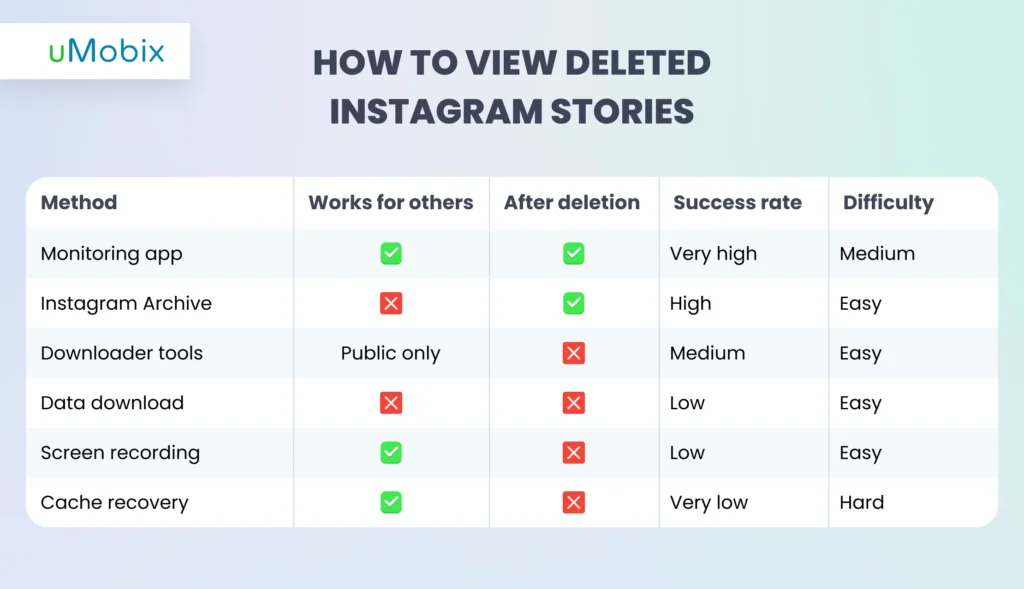
How to View Deleted Instagram Stories: Method Comparison
Can You Recover Deleted Instagram Stories? Technical Explanation
Stories live primarily on Instagram’s servers, not permanently on your device. After 24 hours, the platform automatically removes them from public view. If a story is manually deleted, the server flags it for removal almost immediately. Your device may keep tiny cached fragments for a short time, but these are temporary and usually overwritten quickly. That’s why stories seem to disappear completely, and there’s nothing official left to retrieve deleted Instagram stories.
How Instagram Story Deletion Works
Stories are stored server‑side with brief local caching. Automatic expiration and manual deletion both trigger rapid cleanup, leaving almost no recoverable media behind.
The Monitoring App Advantage
Monitoring apps work differently: they capture stories before deletion, saving copies to local storage. Because the content is archived independently, server removal doesn’t erase those saved records.
How to See Someone’s Deleted Instagram Story Highlights
Instagram highlights are saved story collections that stay on a profile longer than normal 24‑hour stories. They feel permanent, but they aren’t. A creator can remove a highlight at any time, and once it’s gone, viewers lose access immediately.
For your own account, removed Highlights may still exist inside your archive if archiving was enabled. That means you can reopen, repost, or reorganize them. But Instagram does not give you a way to retrieve someone else’s deleted highlights.
If the goal is to keep a record of another person’s stories or Highlights, monitoring tools are the only practical option. These apps capture content while it is live and store it securely, so even if the creator removes it later, the saved version remains accessible, and you can view someone’s deleted Instagram story any time you want.
Viewing Close Friends Stories After Deletion
Close Friends stories are shared with a limited audience, which makes them feel more private. Once deleted or expired, Instagram removes them completely. Access is even more restricted because only approved viewers ever see them. That’s why they’re harder to monitor or recover after the fact. Monitoring apps can capture Close Friends stories only if they’re installed on a device that already has viewing access.
How to View Deleted Instagram Stories on iPhone vs. Android
Viewing deleted Instagram stories can differ depending on whether you’re using an iPhone or an Android device. Each OS has its own limitations that affect how you can recover or monitor stories. Understanding these differences helps you choose the right method and tools for your device.
iPhone-Specific Considerations
iPhones have limited access to cached data, making it difficult to recover Instagram stories from the device itself. You can use built-in screen recording to capture stories before they disappear, but this requires proactive effort. Cell phone monitoring apps can be installed on iOS, but setup is slightly more challenging due to Apple’s security protocols.
Android-Specific Options
Android devices offer more flexibility with file system access, allowing certain stories and media to be retrieved or backed up more easily. Third-party monitoring apps often offer additional options on Android, including background story capture. Setting up monitoring is generally simpler compared to iOS.
Instagram Story Monitoring for Parents
Monitoring Instagram stories is becoming more important for parents today. Stories disappear quickly and can hide risky content, making it hard to keep track of what children see or share. Peer pressure, inappropriate messages, or cyberbullying in story replies can affect a child’s emotional well-being.
Why Parents Need to Monitor Instagram Stories
Instagram stories are temporary and easy to miss, but they can contain content that worries parents. Children may share or view material that isn’t safe, and interactions with peers can influence behavior. Deleted or hidden stories could also indicate conflicts or bullying.
What Parents Can See with Monitoring Apps
Monitoring apps like uMobix capture all stories posted by the child, even if deleted. They can also show which stories the child views, track replies and interactions, and provide insights into Close Friends activity. This helps parents stay informed and understand their child’s online social world.
Legal & Ethical Considerations
Seeing deleted Instagram stories isn’t just a technical question. It’s also a legal and ethical one. Even if tools make access possible, how and why you use them matters.
When It’s Legal
Viewing deleted stories is generally legal when you are monitoring minor children under your guardianship, managing company-owned devices with clear disclosure, or backing up content from your own account. In these cases, the goal is protection, safety, or data management.
Privacy Laws to Consider
Privacy rules vary by country, but most laws focus on consent and a reasonable expectation of privacy. Monitoring an adult without permission can cross legal lines. Always check local regulations before using tracking tools.
Best Practices
Use monitoring responsibly. Be transparent whenever possible, ensure you have a legitimate reason, and respect personal boundaries. Ethical use protects trust while still supporting safety and accountability.
Instagram Story Monitoring vs. Other Social Media
Instagram social media monitoring is more complex than that of other social media apps. Why? Because content disappears quickly and can be manually deleted, unlike posts on Facebook or Twitter that remain visible longer. Instagram requires proactive tools like uMobix to capture deleted or expired stories in real time. By using this app, parents have a clear view of their kids’ interactions, interests, and content they share, thereby protecting their online safety and security.
Conclusion
There are a few different ways people try to access Instagram stories, but each option has its limitations. The built-in archive only covers stories you posted yourself, while downloader tools or data requests yield limited results and often miss deleted content. Monitoring apps like uMobix are the only reliable way to view others’ deleted or expired stories, capturing content before it disappears. Always use these tools responsibly and legally, especially when monitoring children or employees. With the right balance of awareness and ethics, you can protect loved ones and stay informed. Try uMobix today to see deleted Instagram stories safely and effectively.
Common Questions About Deleted Instagram Stories
Instagram keeps deleted stories only briefly for your own account. Once deleted, they disappear and aren’t accessible to others without monitoring tools.
No. Once a story is deleted, the view counts and viewer lists are removed immediately.
No. Instagram does not send notifications when someone downloads your story. Close Friends stories are more private, but still don’t trigger download alerts.
No. Recovering old stories isn’t possible through Instagram alone.
Look for unusual app activity, battery drain, or spikes in data usage. These can indicate background tracking or monitoring software.


Latest posts
- How to Find Deleted Reels on Instagram: 5 Methods That Actually Work
- How to See Unsent Messages on Instagram: 5 Proven Methods (2026)
- Facebook Location Tracker: How to Find Location by Facebook Account?
- Sign up for Spam Calls and Texts: Your Safety Guide
- Parental Emotional Abuse Test– 25 Questions to Identify Harmful Patterns


