


Finding the right apps for parents to monitor social media can feel overwhelming. Parents want to support their children’s independence while also staying informed about their online world. The goal isn’t 24/7 monitoring. It’s creating space for safety, conversation, and trust as children learn to navigate social platforms.
In this guide, we will outline the best social media monitoring apps for parents, explain how each works, and show how to choose the one that best suits your tracking needs. Ready to delve in? If yes, let’s start.
Why Parents Need Social Media Monitoring Apps
Modern children, especially those born in Generations Alpha and Beta, differ from those born earlier. They build friendships, explore interests, and communicate with others through social media apps. At first glance, this switch can sound promising and empowering, but it also introduces new challenges that many parents didn’t experience growing up.
That is where apps for parents to monitor their kids’ social media activity come in handy. They help families stay connected to what matters without turning parenting into policing.
Why do many parents use social media monitoring apps? Here are some of the reasons listed:
- Detecting when something isn’t right: Changes in the way kids message, post, or interact online often show up before they talk about what’s bothering them. Seeing those shifts gives parents a chance to check in early, listen, and offer support before problems feel compelling.
- Keeping an eye on time and attention without constant arguments: Usage patterns make it easier to discuss balance: sleep, school, hobbies, and downtime. It turns screen-time discussions into problem-solving conversations.
- Opening the door to better conversations: Knowing what platforms kids use and how they use them helps parents ask the right questions. It shows genuine interest in their world instead of sounding out of touch or judgmental.
- Supporting emotional health during tough periods: Many children experience stress, self-doubt, or loneliness that first manifests online. Using social media monitoring apps allows parents to respond with reassurance and care, not control.
- Teaching responsibility: Monitoring isn’t about doing everything for kids. It’s about coaching them while they’re still learning. As trust builds, parents can gradually step back while children gain confidence in managing their own online choices.
Need Social Monitoring App?
Choose the best – uMobix offers over 40 monitoring features.
What to Look for in Social Media Monitoring Apps for Parents
Not all monitoring tools offer the same depth or flexibility. What should parents look for when choosing the best parental control app for social media?
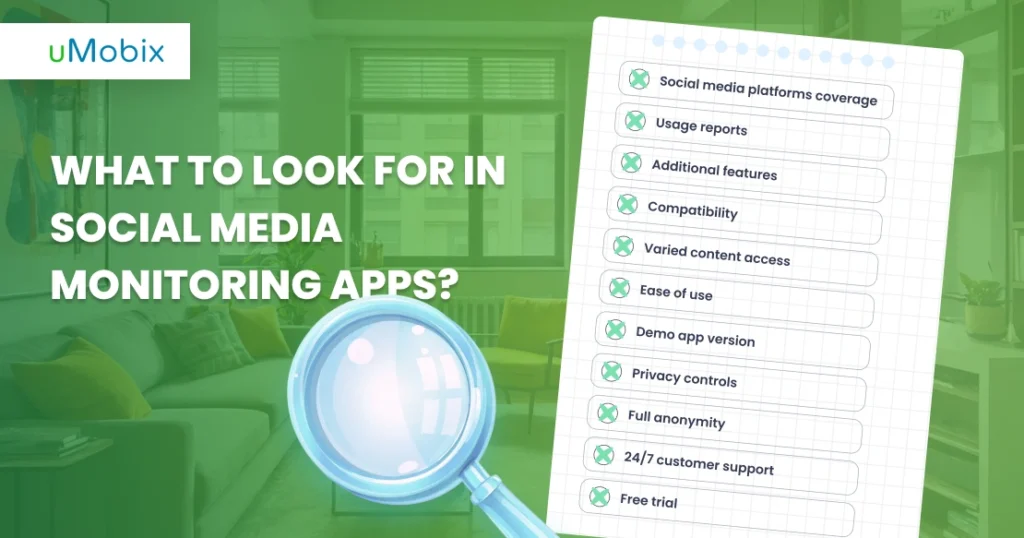
- Social media platforms coverage: Look for apps that support Instagram, TikTok, Snapchat, Facebook Messenger, and other popular messaging platforms.
- Usage reports: Clear data on time spent, app usage, and activity trends helps parents guide healthier online routines.
- Additional features: Beyond basic monitoring, strong apps often include tools for screen time management, app blocking, geofencing, alerts, and device health reports.
- Access to shared text messages, images, and videos: Visibility into shared content helps parents understand context when sensitive issues arise.
- Ease of use: A good parental control app for social media monitoring should be easy to install and use.
- Demo version availability: A demo allows families to explore features before committing.
- Privacy controls and consent tools: Strong apps provide options for gradual monitoring adjustments as children grow, reinforcing trust rather than replacing it.
- Full anonymity: Some families prefer tools that operate quietly in the background, allowing children to behave naturally without feeling constantly observed.
- Full-time customer support: Reliable 24/7 support gives parents peace of mind when questions or technical issues arise.
- Free trial options: A trial period helps parents confirm that the social media monitoring app for parents truly fits their family’s needs before making a long-term decision.
This balance of tools forms the foundation of healthy social media parental controls.
Top 10 Social Media Parental Control Apps Reviewed
1. uMobix – Best All-Around Social Media Monitoring

uMobix is one of the most reliable and well-known apps for parents concerned about their children’s online safety. It is a powerful parental control app that offers over 40 useful tools for discreet, stress-free, and safe monitoring of children’s activities.
It functions as a powerful parental control app, offering detailed tools for modern families.
Key advantages of this social media monitoring app for parents include:
- Broad social media and IM app support includes Instagram, TikTok, Snapchat, WhatsApp, Tinder, Kik, Viber, and Facebook Messenger. As a social media spy app, uMobix shows all text messages exchanged between the two parties before they are deleted.
- Detailed activity tracking with conversation details and interaction summaries.
- Screenshot reporting ensures that no data goes unnoticed.
- Access to deleted text messages across social media platforms.
- Adjustable monitoring levels that allow parents to evolve controls over time.
uMobix not only offers a range of social media monitoring apps for families seeking platform-specific tools. Parents can also use it to view call logs, read text messages, access browser history, use keylogging to understand typing activity, track real-time location, and even enable audio and video streaming. Together, these tools provide meaningful context that helps parents support their children with awareness rather than guesswork. It is one of the best apps for parents to monitor social media activity of their kids.
Choose uMobix for Social Media Monitoring
uMobix is one of the most reliable and well-known apps for parents concerned about their children’s online safety.
2. Bark – Best for AI-Powered Content Detection
Bark social media monitoring app focuses on identifying potentially concerning content rather than providing complete visibility into daily activity. Using AI-based scanning, Bark social media monitoring tool reviews messages, posts, images, videos, and audio across 30+ platforms and sends alerts when something may require a parent’s attention.
This approach can work well for families who prefer selective notifications over detailed monitoring. In addition to content scanning, Bark includes tools for managing screen time, filtering websites and apps, approving contacts, and tracking location, making it a broader digital safety system rather than a complete monitoring solution.
3. Qustodio – Balanced Monitoring for Everyday Digital Life
Qustodio provides a balanced mix of content filtering, app blocking, and activity reports. Its clear dashboard helps parents understand patterns in screen time, browsing, and app use without feeling invasive or overwhelming.
In addition to social media oversight, Qustodio allows parents to set daily time limits, build custom routines, monitor calls and SMS, and receive regular activity reports and alerts.
4. Net Nanny – AI-Powered Content Filtering for Younger Children
Net Nanny social media monitoring app for parents focuses on content filtering and real-time alerts. Its Social Media Protection feature allows parents to block, allow, or protect specific services, applying the same content-filtering rules used for web browsing to social media apps.
Instead of simply blocking platforms, Net Nanny reviews content using AI-powered analysis to determine appropriateness, helping parents monitor online activity while still allowing kids to access age-appropriate material.
5. Norton Family – Structured Supervision and Screen-Time Control
Norton Family offers web and app supervision, screen-time management, and detailed activity reports. Its School Time feature helps parents keep children focused on learning while limiting distractions. It integrates with existing Norton security tools, but some features, such as call and SMS monitoring, require additional setup.
6. Kaspersky Safe Kids – Insightful, Non-Intrusive Oversight
Kaspersky Safe Kids offers a combination of online content filtering, screen time management, and location tracking. Its tools let parents set safe boundaries for websites, apps, and YouTube searches while also monitoring device usage patterns. GPS tracking and location alerts provide detailed information on a child’s whereabouts, enabling parents to respond immediately if needed.
7. FamiSafe – Geofencing and Content Alerts with Some Limitations
FamiSafe provides tools such as geofencing, screen time management, and content alerts to monitor kids’ digital activity. While it covers multiple social media platforms and YouTube, some features, like iOS social app detection, are limited. Its interface can feel cluttered, and setting up alerts and filters may take longer than in other apps.
8. Eyezy – Comprehensive Visibility into Social Media and Messaging
Eyezy provides detailed information on social media and phone activity, showing who children communicate with and what content they share with other users. Some features, such as live screen streaming and keylogging, may feel intrusive, and setting them up can be complex for less tech-savvy users.
9. mSpy – Full Device Monitoring with Advanced Features
mSpy lets parents monitor messages, social apps, and overall device activity, so they can review chats, media, and location history. Some tools, such as keylogging and live screen recording, can appear intrusive and may be difficult to set up. Keep in mind that monitoring certain apps may require additional permissions and may not work on every device.
10. FamilyTime – Extensive Controls with Potential Privacy Concerns
FamilyTime lets parents track their child’s device, including location, app limits, and social media activity. Some features can feel too intrusive and take time to set up, which might raise privacy concerns. Also, not everything works perfectly on every device or platform.
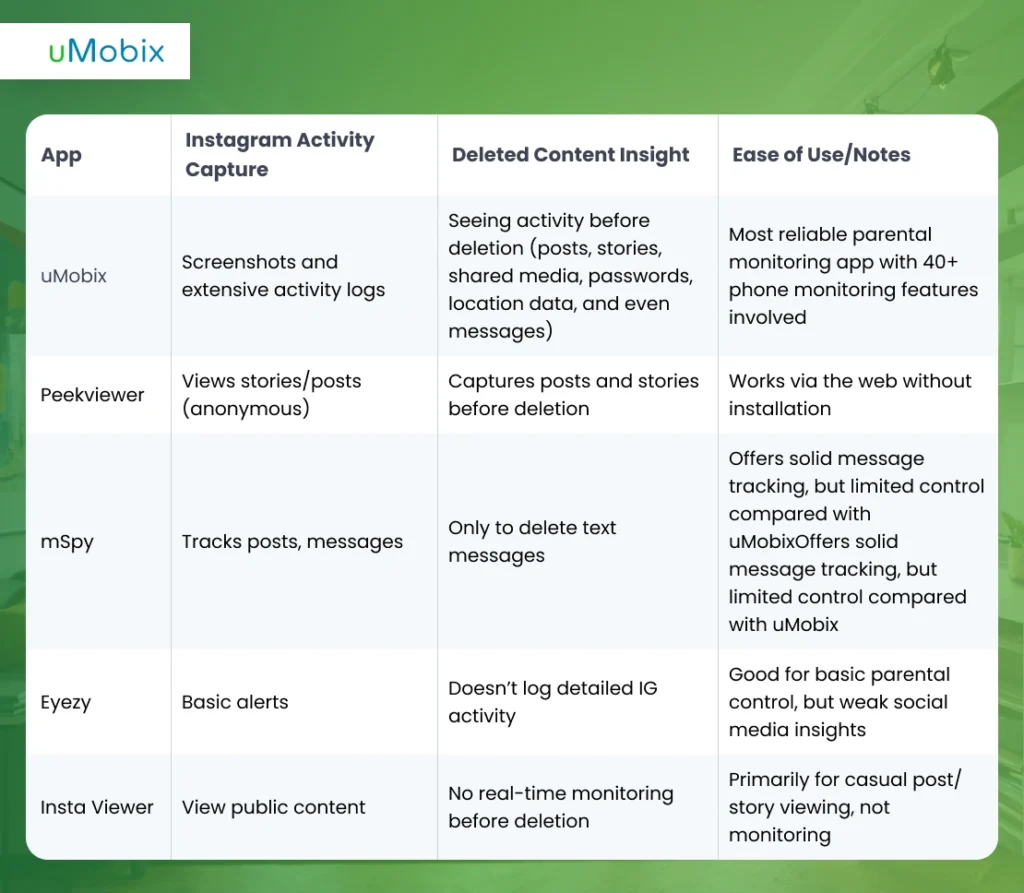
Social Media Monitoring Apps Comparison Table
Platform-Specific Monitoring Capabilities
Different parental control apps vary in how well they monitor specific platforms and devices. Some focus on social media, while others cover messaging apps, browsing activity, or location tracking. Understanding these platform-specific capabilities can help you choose the right app for your family’s needs.
Instagram Monitoring Features
Many apps for parents to monitor social media provide tools specifically for Instagram. uMobix includes an advanced Instagram spy system that helps parents understand messaging patterns, interactions, and content engagement. Compared to other apps, this one provides access to deleted data and full control over your IG account, so you can manage it as your own.
TikTok Parental Controls
TikTok is widely used by teens, but the endless videos and trends can make it hard for parents to keep track of what their kids are watching. A TikTok spy tool can help parents monitor interactions and viewing habits, giving them a better understanding of what’s happening and making it easier to have calm conversations about safe and responsible use.
Snapchat Monitoring Challenges
Snapchat’s disappearing messages and multimedia posts make it difficult to know what kids are sharing or receiving. A Snapchat spy tool can provide insights into chats and interactions, helping parents stay informed without constantly intruding.
Free vs. Paid Social Media Monitoring Apps
Free social media monitoring tools can be a good starting point, giving parents a foot in the door to set screen time limits or block certain apps. But they usually don’t give the full picture of what kids are doing online. Paid social media monitoring apps for parents, step it up. They let parents check chats, media, and activity across multiple platforms at once. You can also set up keyword alerts, block risky content, and get real-time notifications when something seems off. They also come with updates, support, and better privacy protections
How to Choose the Right App for Your Family
Every family dynamic is unique. Choosing the proper social media monitoring app for parents depends on:
- Your child’s age and maturity level: Younger children may need stricter controls, while teens may benefit from greater independence.
- How much visibility you want: Decide whether to monitor activity in real time, receive weekly reports, or track general trends.
- Your family’s communication style and values: Some parents prefer open discussions about online activity, while others rely on more discreet monitoring.
- Device types and platforms: Ensure the app supports all devices and social networks your child uses.
- Customization options: Look for apps that let you set specific restrictions, keyword alerts, or time limits based on your child’s needs.
- Ease of use: A complex app can discourage consistent use, so choose one that’s intuitive for parents and manageable for children.
The right parental control app for social media supports conversation, not conflict, and helps parents stay informed without constantly intruding.
Setting Up Social Media Parental Controls: Step-by-Step
Before implementing any monitoring tools, it’s important to have a clear plan and involve your child in the process. Setting up social media parental controls can be done in manageable steps that balance safety with trust:
- Discuss expectations openly: Talk about online behavior, privacy, and boundaries so your child understands the purpose of monitoring.
- Explain why monitoring exists: Emphasize that controls are meant to support trust and safety, not to punish or spy.
- Choose appropriate tools: Pick apps or settings that align with your child’s age, maturity, and the platforms they use most. If they use Facebook to chat with others, ensure the tool you install includes a Facebook Messenger tracker.
- Review together regularly: Hold periodic check-ins to help your child feel involved and understand adjustments.
- Adjust as they grow: Gradually ease restrictions while promoting responsibility, helping them develop healthy online habits.
This flexible, step-by-step approach ensures controls are practical, age-appropriate, and respectful of your child’s independence.
Balancing Privacy and Safety: The Right Approach
The purpose of apps for parents to monitor social media is not control but care. When children understand the “why” behind monitoring, it becomes a partnership rather than a conflict.
Parents who combine tools with regular conversation create stronger digital resilience than any app could alone.
Legal and Ethical Considerations
Laws governing monitoring can vary, so parents need to comply with the rules. At the same time, it’s important to be upfront with your kids and not step on their toes. A parental control app for social media should help you monitor activity and guide them safely.
Conclusion
The best social media monitoring apps for parents are tools, not replacements for communication, trust, and guidance. Used thoughtfully, they help families stay connected, informed, and supportive as children grow in an increasingly online world.
With the right apps for parents to monitor social media, families can navigate that world together: safely, respectfully, and confidently.

Latest posts
- How to Find Deleted Reels on Instagram: 5 Methods That Actually Work
- How to See Deleted Stories on Instagram: 6 Working Methods (2026)
- How to See Unsent Messages on Instagram: 5 Proven Methods (2026)
- Facebook Location Tracker: How to Find Location by Facebook Account?
- Sign up for Spam Calls and Texts: Your Safety Guide


